Google Ads Quality Score is a 1 to 10 diagnostic rating, measured at keyword level, built from three components: expected click-through rate, ad relevance and landing page experience. It exists to tell you where your account is weak, not to be chased for its own sake. The right response to a low score is to find the underperforming keyword or ad group behind it and fix what is actually holding back conversions.
TL;DR:
- High impression and spend keywords with below average Quality Score components should be prioritized for fixing, especially if they cost a lot and drive conversions.
- Improving landing page experience is the most actionable fix, since it is entirely within your control and can immediately impact scores.
- Regularly monitoring component status changes, especially on high-impact keywords, helps catch problems early and prevents wasted budget.
- Structural ad group issues, like broad targeting, often cause low relevance and should be split into themed clusters for quick improvement.
- Focusing on account structure and conversion performance yields better results than chasing specific score numbers or superficial optimizations.
Table of Contents
- What is Google Ads Quality Score, really?
- How is Quality Score calculated? The three components explained
- Where to find and report Quality Score in Google Ads
- Using Quality Score as a diagnostic: which keywords to fix first
- How to improve your Google Ads Quality Score, component by component
- Tracking progress: what to expect and when
- Common misconceptions about Quality Score
- How Fyldedigital approaches a Quality Score audit for clients
- What the data actually tells you to prioritise
- Want an agency to run the audit instead?
- Sources
What is Google Ads Quality Score, really?
Quality Score gives you a relative comparison, not an absolute grade. Google measures your keyword against every other advertiser bidding on the exact same search over the previous 90 days, and reports the result as a number between 1 and 10, according to Google Ads Help. That rolling window explains something that confuses a lot of advertisers: your score can move even if you haven’t touched your account.
If a competitor sharpens their ad copy or rebuilds a landing page, the comparative bar shifts and your score can drop through no fault of your own. Each of the three components carries its own status:
- Above average, meaning you’re outperforming the competitive set for that search
- Average, meaning you’re roughly in line with the field
- Below average, meaning you’re losing ground and it’s worth investigating
Treat the number as a prompt to investigate, never as a target to hit. A keyword sitting at 6/10 that converts well and hits your target cost per acquisition needs no attention at all. A keyword at 4/10 driving thousands of impressions with a below average landing page experience status is the one worth your time this week.
How is Quality Score calculated? The three components explained
Quality Score is built from expected CTR, ad relevance and landing page experience, and Google recommends reviewing each one individually rather than treating the overall number as a single lever, per Google Ads Help.
Expected CTR predicts how likely your ad is to be clicked when it’s shown for that keyword, independent of ad position. It’s shaped by historical performance for similar searches, the strength of your offer and how well your ad copy speaks to what the searcher actually typed.
Ad relevance measures how closely your ad matches the intent behind the keyword. Loose account structure is the usual culprit here: one ad group covering a dozen loosely related terms will almost always show weaker relevance than five tightly themed groups.
Landing page experience covers mobile usability, page speed and how directly the page content matches what the ad promised. A beautifully designed homepage sent traffic meant for a specific product page will score poorly here regardless of how good the site looks.
Each component gets its own status label:
- Above average, average, or below average, assessed relative to other advertisers for the same keyword
- A below average status on any single component is enough to drag the overall score down, even if the other two are strong
- Google treats these statuses as diagnostic signals rather than penalties
A below average landing page experience status is often the single most correctable factor in the trio, because it’s the component entirely within your control, unlike expected CTR, which is shaped partly by historical auction data you can’t rewrite overnight.
Where to find and report Quality Score in Google Ads
You won’t see Quality Score anywhere by default, which is exactly why so many accounts run for years without anyone checking it.
- Open the Keywords page inside a search campaign, then click the Columns icon above the statistics table.
- Select Modify columns, find the Quality Score section, and tick Quality Score plus the three component columns (Exp. CTR, Ad Relevance, Landing Page Exp.).
- In the same menu, tick Quality Score (hist.) and the historical versions of each component to track movement over time, a feature confirmed in Google Ads Help.
- Apply the columns, then segment by day or device from the Segment dropdown to spot patterns before you commit to a fix.
- Export the table to a spreadsheet for your ppc audit checklist so you’ve got a dated baseline to compare against after changes go live.
Using Quality Score as a diagnostic: which keywords to fix first
The most common mistake in a google ads audit checklist is working through every low-scoring keyword in order, regardless of whether that keyword matters to the business. Quality Score alone doesn’t tell you what to prioritise; conversion rate, cost per acquisition and value per click do.
- High impressions, high spend, below average status: fix this first. It’s costing you money at scale.
- Low impressions or zero conversions in 90 days: deprioritise, however poor the score looks.
- Below average landing page experience on a converting keyword: investigate anyway. A page that converts despite a poor score is usually one good change away from converting better.
- Below average ad relevance clustered in one ad group: a structural problem, not a copywriting one. Split the group before rewriting ads.
A quick filter for any ppc audit template: sort keywords by impressions descending, then look at which ones carry a below average status on any component. Cross-reference against search terms and device segments to see whether the weak signal is concentrated on mobile, on a specific match type, or on a handful of loosely related queries sharing an ad group.
Pro Tip: Run this filter monthly rather than quarterly. Component statuses move faster than most advertisers expect, and a below average flag caught early is far cheaper to fix than one that’s been quietly draining budget for a season.
How to improve your Google Ads Quality Score, component by component
Improving your score comes down to fixing whichever component is dragging, not applying generic advice across the whole account. Google’s own guidance frames the fix as three separate jobs: sharpen ad relevance, lift expected CTR, and update landing pages to match intent, according to Google Ads Help.
Expected CTR tactics:
- Lead with a specific value proposition in the headline rather than a generic category term
- Add urgency where it’s genuinely true (limited stock, seasonal offer) rather than manufactured
- Use every relevant asset (sitelinks, callouts, structured snippets) since responsive search ads reward fuller asset coverage
- Test one headline variable at a time and measure against conversion rate, not clicks alone
Ad relevance tactics:
- Split any ad group covering more than a handful of loosely related terms into tighter, themed groups
- Mirror the keyword’s exact language in at least one headline per ad
- Add negative keywords weekly to strip out searches that trigger your ad but don’t match intent
- Review search term reports before writing new copy, not after
Splitting broad ad groups into themed clusters tends to lift ad relevance quickly because it’s a structural fix, not a creative gamble, and the effect often shows up within the next reporting cycle.
Landing page tactics:
- Match the page headline to the ad headline word for word where possible; message mismatch is the fastest way to a below average status
- Prioritise mobile load speed above every other technical fix, since most search traffic now arrives on a phone
- Keep the call to action visible without scrolling and the form short enough to complete in under a minute
- Send traffic to a page built for that specific offer, never the homepage by default
Fyldedigital’s guide to PPC landing pages that generate leads covers message match in more depth, and the partner resource on how to create a landing page that converts is worth a read for CTA placement specifically.
Testing and measurement: write a hypothesis before you touch anything (“shortening the form from seven fields to three will lift conversion rate on mobile”), run the test long enough to reach confidence on conversion data rather than CTR alone, and judge the result against the business outcome you actually care about.
Tracking progress: what to expect and when
Component statuses rarely update overnight. Give a landing page fix at least a week before checking, and a full ad group restructure closer to two to three weeks before drawing conclusions, since Google needs fresh impression data against the same 90 day comparative window to recalculate your standing.
- Use the Quality Score (hist.) column alongside the live column to see the before and after side by side, rather than relying on memory
- Pull the component historical columns too; a status can flip from below average to average on landing page experience while ad relevance stays flat, and you’ll miss that if you only watch the headline number
- Cross-reference movement against cost per click, impression share and conversion rate in the same date range. A rising score paired with a falling conversion rate is a warning sign, not a win
The goal isn’t a prettier column in your reporting spreadsheet. It’s cheaper clicks and more conversions, and the score is only useful insofar as it points you towards both.
Common misconceptions about Quality Score
Quality Score is not an input to the live auction. Ad Rank is calculated separately at the moment of the auction, and your visible Quality Score is a retrospective diagnostic, not a real-time bidding factor, according to Google Ads Help.
- Changing a keyword’s match type does not itself alter its Quality Score, because the score is built from historical impressions against exact searches for that keyword, not the match type wrapped around it
- A static, unchanged account can still see its score drop, since the comparison is against every other advertiser bidding the same search, and their activity moves independently of yours
- Chasing expected CTR by writing sensational or misleading headlines will often lift the number while quietly damaging conversion rate, which defeats the entire point of running the campaign
- Obsessing over single-point movements wastes time better spent on the underlying component causing the shift
How Fyldedigital approaches a Quality Score audit for clients
Every ppc audit checklist Fyldedigital runs for a client starts the same way: pull keywords by impressions, flag anything carrying a below average component status, then split that shortlist by device and ad group to find the actual root cause before touching a single ad.
Three fixes come up repeatedly: consolidating oversized ad groups into themed clusters, rewriting landing page headlines to match the ad word for word, and stripping mobile page load times down where speed is quietly capping conversion rate. Readers who want to run this themselves first can start with Fyldedigital’s Google Ads audit review, built as a practical checklist rather than a sales pitch.
What the data actually tells you to prioritise
The conventional advice on Quality Score treats it as something to optimise directly, and that’s where most accounts waste their time. The three components are outputs of decisions you’ve already made about structure, copy and page design. Chasing the number itself, rather than the decision behind it, gets advertisers rewriting headlines for a week when the real problem is an ad group covering nine unrelated services.
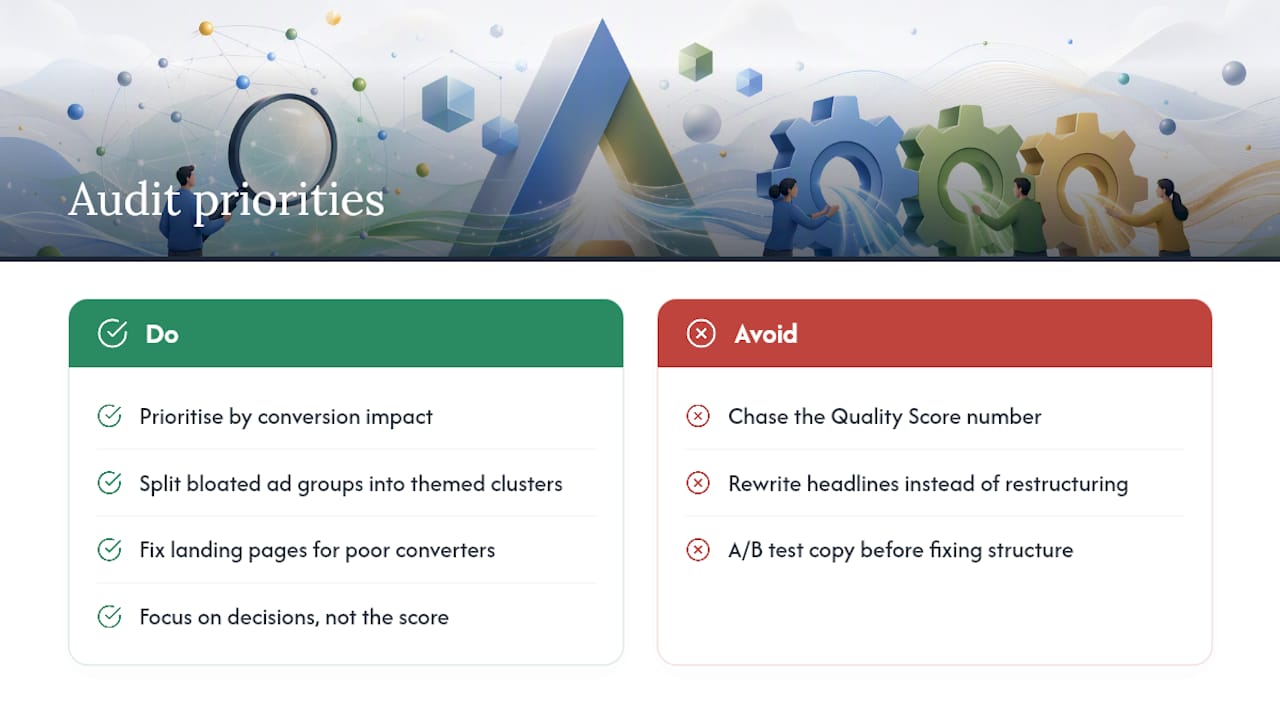
What’s consistently underrated is how much account structure does the heavy lifting. Splitting a bloated ad group into themed clusters fixes ad relevance and often expected CTR simultaneously, with none of the guesswork involved in A/B testing headline copy. What’s overrated is the fixation on hitting a specific score. A 6/10 keyword converting at your target cost per acquisition needs nothing. A 4/10 keyword burning budget with no conversions needs a landing page rebuild, not a new headline.
Prioritise by conversion impact first, component status second. The reader who audits their account this way will spend less time moving numbers that don’t matter and more time fixing the two or three keywords quietly costing them the most.
— tibor
Want an agency to run the audit instead?
An agency can be an alternative to spending your own hours cross-referencing spreadsheets and column exports. A short PPC audit from an agency can cover exactly the ground this article walks through: component statuses across your keyword set, landing page message match, and account structure, delivered back with a prioritised list rather than a generic health check.

It is designed for small and medium-sized businesses that suspect wasted ad spend but don’t have the time to build a PPC audit template from scratch. A typical review takes a few working days once account access is granted and comes back with concrete fixes ranked by likely impact on conversions, not vanity metrics. If landing pages are the weak point, some agencies also build and rebuild pages designed around message match and mobile speed rather than generic templates. Get a free Google Ads audit review or explore Fyldedigital’s web design services to see how a rebuilt landing page fits into the wider fix.