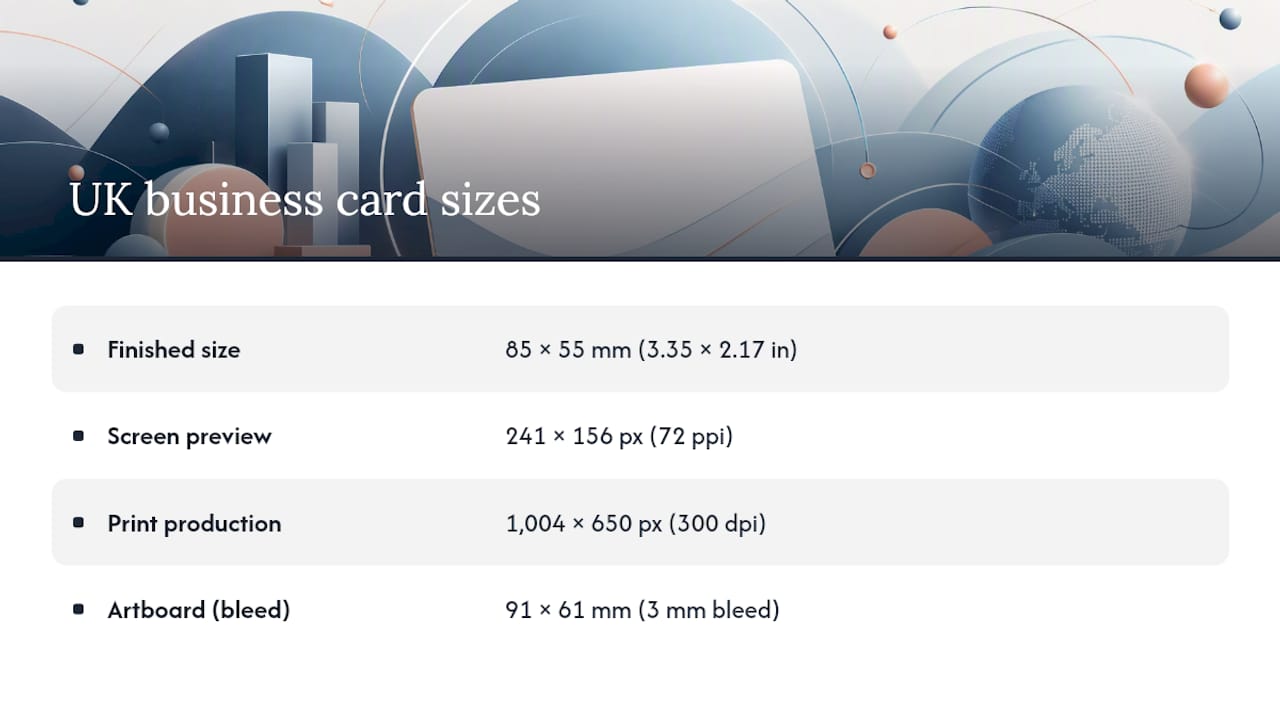
The standard UK business card finished size is 85 × 55 mm, roughly 8.5 × 5.5 cm or 3.35 × 2.17 inches. At 300 ppi that translates roughly to around 1,000 × 650 pixels for digital exports. It matches the footprint of a credit card, so it slides into wallets and cardholders without a second thought. Just remember that print-ready artwork needs extra room beyond this trim size, usually a few millimetres for bleed.
TL;DR:
- Design artwork at 91 by 61 millimeters to include a 3 millimeter bleed on each side, avoiding white borders or cut issues.
- Keep all critical content within 5 millimeters of the trim line to prevent it from being cut off during the trimming process.
- Use a resolution of 300 dpi and convert files to CMYK, embedding or outlining fonts to ensure color accuracy and font integrity in printing.
- Alternative sizes like mini, square, US, or long formats alter wallet compatibility and visual impact, but may sacrifice ease of storage and standard recognition.
- Printing costs and turnaround times vary based on stock, finish, quantity, and complexity, with smaller runs being cheaper but slower if custom finishes are added.
Table of Contents
- What is the size of a business card in the UK? Exact measurements and pixel conversions
- Bleed, safe area, resolution and file formats: the artwork checklist
- Mini, square, US and long formats: alternative business card sizes explained
- Paper weight, thickness and finish: what changes the feel and the cost
- Rounded corners and die-cuts: getting special shapes right
- Choosing the right business card size for your purpose
- Step-by-step export checklist for a UK printer
- Fylde Digital’s practical notes on print-ready artwork
- UK printing standards and regulations related to business cards
- UK design trends shaping business cards right now
- What does printing business cards cost in the UK?
- How long does UK business card printing take?
- Getting business card sizing right, from someone who’s seen it go wrong
- Get your business card artwork print-ready with Fylde Digital
- Sources
What is the size of a business card in the UK? Exact measurements and pixel conversions
The finished, trimmed dimensions for a standard UK business card size are 85 mm × 55 mm. Convert that and you get 8.5 cm × 5.5 cm, or approximately 3.35 inches × 2.17 inches if you’re working in a design tool set to imperial units. Whether you print it in portrait or landscape orientation, the two measurements stay the same, only the layout rotates.
For screen mockups or web previews, 72 ppi is the usual resolution, giving you a much smaller pixel canvas that’s fine for previews but useless for print. For actual production, you need 300 dpi, which puts the pixel dimensions at roughly 1,004 × 650 px for the finished 85 × 55 mm size.
Here’s where a lot of confusion creeps in: the “finished size” is not the same as the artboard size you should actually design on. Your artboard needs to be larger, to accommodate bleed, which we’ll cover next. Skip that step and you risk a card with a thin white sliver along one edge, or worse, text sliced off entirely.
Bleed, safe area, resolution and file formats: the artwork checklist
Printers trim thousands of cards at speed, and even a fraction of a millimetre of movement in the cutting stack can shift where the blade lands. That’s why every print-ready file needs 3 mm bleed on all four sides, taking your artboard from 85 × 55 mm to 91 × 61 mm. Any background colour, image, or pattern needs to extend into that bleed zone so there’s no visible border if the cut drifts slightly.
At the other end, keep anything you actually care about, logos, contact details, taglines, inside a safe area roughly 5 mm inside the trim line. That gives you a buffer against minor cutting variance without anyone noticing a cramped layout.
Before exporting, run through this:
- Design at 300 dpi, never lower, or edges and text will look soft once printed.
- Convert to CMYK colour mode. RGB files can shift colour unpredictably when converted by the printer instead of you.
- Export as a print-ready PDF, ideally PDF/X, which locks in fonts and colour settings.
- Embed or outline all fonts so nothing reflows or substitutes on someone else’s machine.
- Add crop marks so the trim line is unambiguous.
- Flatten transparency layers if your printer requests it, some RIP software handles live transparency poorly.
Pro Tip: Always ask your printer for a digital proof before signing off a bulk run. A five-minute check against your safe area guidelines can save an entire batch of misprinted cards.
Mini, square, US and long formats: alternative business card sizes explained
Straying from the standard 85 × 55 mm isn’t reckless, provided you understand what you’re trading away.
- Mini (85 × 25 mm). A slim strip that suits minimal information, a name, a phone number, maybe a QR code. Wallet compatibility varies by manufacturer, so don’t assume it’ll sit neatly alongside standard cards.
- Square (55 × 55 mm). Strong shelf appeal and a distinctive look on a desk or in a display holder, but it won’t slot into most wallet card slots, which are cut for rectangular cards.
- US/American (a slightly different dimension commonly used in North America). Marginally different from the UK standard, worth using if you’re networking with US contacts, exhibiting stateside, or working from a US-supplied template where resizing would distort the design.
- Long (90 × 55 mm). Extra horizontal space for a longer tagline or a second language line, at the cost of slightly reduced compatibility with slimmer cardholders and wallet pockets.
Paper weight, thickness and finish: what changes the feel and the cost
Card stock weight is measured in gsm, and it has a bigger effect on perceived quality than most people expect. Economy print runs often sit below 300 gsm and feel noticeably thinner in the hand. Premium jobs typically run 300 to 450 gsm, giving that reassuring rigidity people associate with an established, well-funded business.
Finish matters just as much as weight:
- Matt lamination gives a soft, modern, non-reflective surface that photographs well.
- Gloss adds shine and makes colours pop, though fingerprints show more easily.
- Soft-touch has a velvety texture that people notice the moment they pick the card up.
- Spot UV adds raised gloss detail over specific elements, like a logo, against a matt background.
- Plastic or PVC stock mimics a credit card’s rigidity and waterproofing, at a higher unit cost.
Each finish shifts how colour reads too, gloss intensifies saturation, matt mutes it slightly, so proof carefully if brand colour accuracy matters.
Rounded corners and die-cuts: getting special shapes right
Rounded corners are a low-cost way to soften a card’s look without touching the print budget much. Ask your printer what radii they offer as standard, 2 mm, 3 mm and 6 mm are common options, and specify which one you want rather than leaving it to guesswork.
Die-cut shapes go further, but they need generous margins around any text or logo near the cut line, since cutter tolerances are less forgiving on curves and notches than on a straight trim.
- Confirm the exact radius or die shape in writing before the job goes to print.
- Request a physical or digital proof so you can check the cut against your safe area.
- Ask about cutter tolerance, some finishing houses hold tighter tolerances than others on unusual shapes.
Choosing the right business card size for your purpose
Standard 85 × 55 mm wins on keepability, it fits wallets and cardholders, which improves the odds someone still has it weeks later. Alternative sizes trade that convenience for standout appeal, useful at trade shows or events where memorability matters more than long-term retention.
Think about distribution too. Cards handed out face to face can afford to be unconventional. Cards mailed out or bundled into packaging need to survive transit without bending, favouring sturdier stock. And budget scales with complexity: small runs of standard cards are cheap per unit, while die-cuts, foiling, or short runs of premium stock push the unit cost up noticeably.
Step-by-step export checklist for a UK printer
- Set your artboard to 91 × 61 mm, that’s the 85 × 55 mm finished size plus 3 mm bleed on each edge.
- Add crop marks so the trim line is clearly marked.
- Keep all text and logos within a safe area roughly 5 mm inside the trim line.
- Place all images at 300 dpi and convert the whole file to CMYK.
- Embed or outline every font used.
- Export as PDF/X where your printer supports it, and always request a proof before committing to a full print run.
Fylde Digital’s practical notes on print-ready artwork
We regularly prepare business card artwork for small and medium-sized businesses across the Fylde Coast and beyond, and the same mistakes crop up again and again, missing bleed, RGB files sent to CMYK printers, text sitting too close to the trim edge. A quick file check before submission catches almost all of it.
UK printing standards and regulations related to business cards
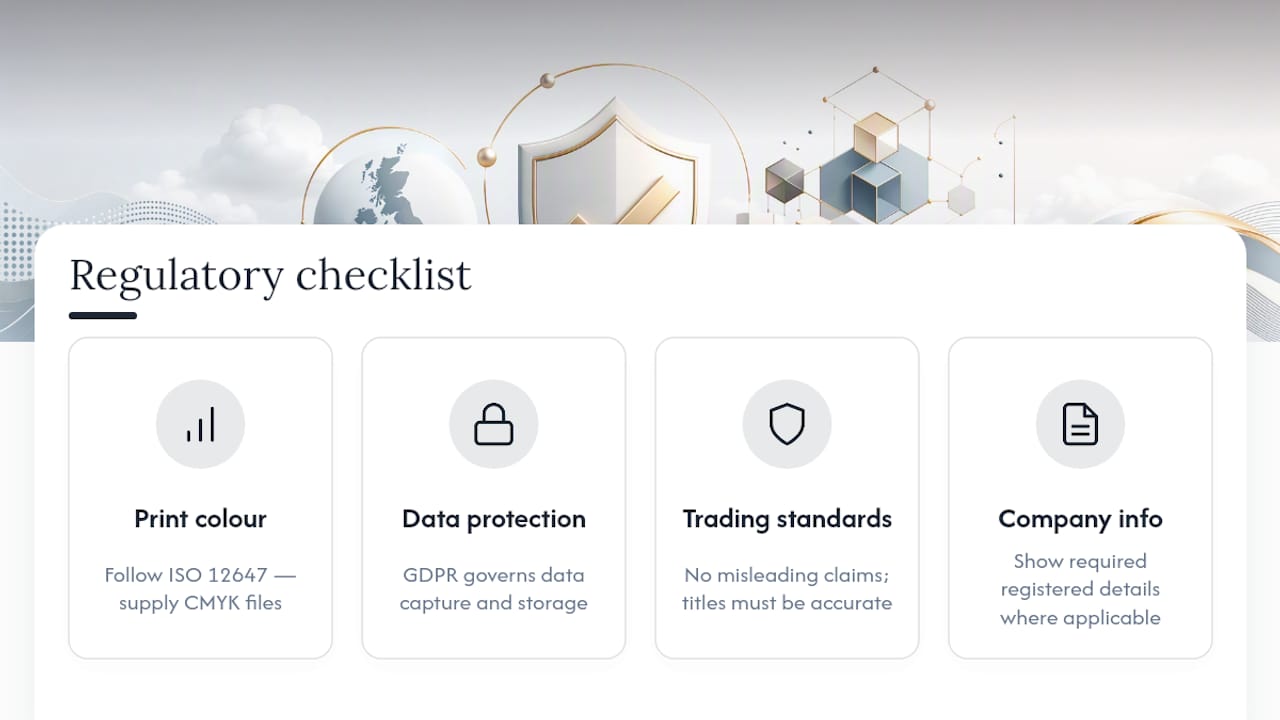
Business cards themselves aren’t subject to a dedicated regulatory body in the way food packaging or pharmaceutical labelling is, but several standards still apply indirectly. Colour accuracy and print quality in the UK commercial print trade generally follow ISO 12647 principles for CMYK reproduction, which is why professional printers ask for CMYK files rather than RGB, it keeps colour predictable across different presses.
Data protection is the area business owners overlook most. If a card includes a QR code linking to a data capture form, or if you’re printing cards in bulk with individual employee contact details, GDPR still governs how that personal data is collected and stored once someone scans or uses it. That’s less about the card’s dimensions and more about what happens after someone acts on the information printed on it.
Trading Standards rules around misleading claims apply to anything printed on a card too, professional titles, qualifications, or certifications listed must be accurate. And if a card carries a registered trademark, logo, or company registration number, the usual rules around company information display (particularly for limited companies, which must show their registered details on certain business stationery under the Companies Act) still apply, even on something as small as a card.
None of this changes the physical dimensions. But it does mean the content on a compliant card deserves the same scrutiny as the layout.
UK design trends shaping business cards right now
British business card design has moved distinctly toward restraint. Heavy gradients and busy backgrounds have fallen out of favour, replaced by generous white space, a single strong accent colour, and typography doing most of the work. It mirrors what’s happened in UK web design more broadly, cleaner interfaces, fewer competing visual elements, more confidence in simplicity.
Soft-touch and matt finishes dominate over high-gloss, particularly among professional services, consultancies, and creative agencies wanting a tactile, premium impression rather than a shiny, mass-produced one. Spot UV detailing on logos remains popular as a subtle way to add texture without shouting about it.
QR codes have become genuinely common again, not as a novelty but as a practical bridge to a digital portfolio, booking page, or LinkedIn profile. Pair that with a card that still looks deliberately minimal and you get the best of both formats, digital reach with a tactile handover.
Sustainability is shaping material choices too. Recycled and FSC-certified stocks, uncoated finishes, and soy-based or vegetable inks are increasingly requested by UK businesses wanting their print materials to match sustainability claims made elsewhere in their branding. It’s a small physical object, but it’s one more place where brand consistency either holds up or falls apart.
What does printing business cards cost in the UK?
Price hinges on three levers: quantity, stock, and finish. Small runs of standard 350 gsm matt or gloss cards in modest quantities sit at the budget end, while premium runs with soft-touch lamination, spot UV, or plastic stock cost considerably more per unit.
Bulk ordering brings the per-card cost down sharply because setup costs get spread across more units, a common pattern across UK litho and digital print pricing. Special finishes, rounded corners, foiling, die-cuts, add a fixed premium on top regardless of quantity, so they hit small runs proportionally harder than large ones.
If you’re weighing print marketing spend against other channels, it’s worth reading up on broader print marketing ideas that actually move the needle for small businesses, business cards are rarely the only printed item worth budgeting for.
How long does UK business card printing take?
Standard turnaround for UK print firms generally takes several working days after artwork approval. Faster express services may be available at additional cost, while premium finishes often require more time.
The single biggest delay isn’t the press, it’s proofing. Files that fail preflight checks (missing bleed, wrong colour mode, low-resolution images) get bounced back for correction, adding days before the job even enters the print queue. Getting your artwork right the first time, using the export checklist above, is the fastest route to a quick turnaround.
Delivery adds further time on top of production, so if you need cards for a specific event, always build in a buffer rather than ordering against the deadline itself.
Getting business card sizing right, from someone who’s seen it go wrong
Most clients who come to us with card artwork have got the finished size right, 85 × 55 mm is well known by now. What trips people up is everything around it: no bleed, text creeping too close to the trim edge, or a logo file exported in RGB from a web project and never converted. These aren’t design failures, they’re workflow gaps, and they’re entirely avoidable with a five-minute check before a file goes to print.
If you’re unsure whether your artwork is print-ready, ask for a file check before you commit to a run. It costs nothing and it catches problems while they’re still cheap to fix.
— tibor
Get your business card artwork print-ready with Fylde Digital
Getting the size right is only half the job, the artwork behind it needs to be built correctly before a printer will touch it. Some digital marketing agencies and graphic designers assist small and medium-sized businesses in preparing graphic design, branding, and print-ready files that pass preflight checks, avoiding issues like missing bleed or incorrect colour modes.

Beyond individual cards, we handle the wider print and branding work that surrounds them, letterheads, compliment slips, signage, so everything leaves looking like it belongs to the same business. If a strong printed presence needs a website to match, our web design service covers that too. Get in touch for a file check or a quote on your next print run, and we’ll tell you exactly what needs fixing before it costs you a wasted batch.
Sources
- The definitive guide to printing business cards in the United Kingdom
- What size is a business card? Standard business card size in mm & pixels
- Size & dimensions guide – Solopress UK