Google Business Profile posts are short-form updates that appear directly in Search and Maps, letting you promote offers, events, and news without touching your website. The single best action for most small businesses is to post weekly with a clear call-to-action button, since active profiles signal freshness to Google’s local ranking system. Start there, then refine your approach as you see what resonates.
TL;DR:
- Posting weekly with a clear call-to-action significantly boosts local ranking signals, especially when posts include relevant offers, events, or news, and targeted CTAs like BOOK or CALL.
- Posts appear differently across devices, with desktop showing a scrollable carousel on Search and mobile displaying posts higher in search results, emphasizing the importance of strong opening lines.
- Creating effective posts involves careful attention to image quality, concise copy of around 100-150 words, and timely publication aligned with seasonal or promotional calendars.
- Content violations, especially including phone numbers in post text, lead to removal and can slow future approval processes; using the CTA button is crucial for contact-related calls.
- Regular review of insights and setting up tracking with UTM parameters helps measure real conversions from posts, guiding continuous optimization and A/B testing strategies.
Table of Contents
- What are Google Business Profile posts and their main types?
- Where do posts appear on Search and Maps?
- How do you create a post on Google Business Profile?
- Post ideas and best practices that actually get results
- What content is restricted or prohibited on Google Business Profile posts?
- How do you measure whether your posts are working?
- What do the 2026 API and Gemini updates mean for your posting workflow?
- Fylde Digital’s playbook: templates and what to expect
- Our first-person take: how we actually use GBP posts in client campaigns
- How Fylde Digital can help with your Google Business Profile
- Sources
What are Google Business Profile posts and their main types?
Google Business Profile posts fall into four categories, and choosing the right one matters more than most business owners realise. Google’s own guidance confirms these updates appear directly on Search and Maps, sitting right where a potential customer is already looking at your listing.
Update posts cover general news: a new product line, a change of hours, a staff announcement. Offer posts let you attach a coupon code, start and end dates, and terms, making them the natural home for seasonal promotions. Event posts work for anything with a fixed date, a wine tasting, a charity fundraiser, a product launch. Product posts, available to businesses with a product catalogue, showcase individual items with pricing.
Every post type supports a call-to-action button, and picking the right one shapes whether a browser becomes an enquiry. The options are:
- BOOK, for appointment-based businesses linking to a booking page
- ORDER, for takeaway and delivery services
- SHOP, for e-commerce or product pages
- LEARN_MORE, the flexible default for general information
- SIGN_UP, for newsletters, waitlists, or memberships
- CALL, which dials your verified business number directly
CTA buttons must link to a genuine website URL, with one exception: the CALL button, which connects to the phone number verified on your profile rather than a link. Crucially, Google’s posts documentation confirms phone numbers cannot appear in the post’s written copy, so if you want people to ring you, use the CALL button, not a number typed into the text.
Two quick examples worth copying. A hairdresser might write: “Free fringe trim with any colour service this month. Book before Friday.” with a BOOK button. A café might write: “New autumn menu is live, featuring spiced pumpkin loaf and chai lattes.” with a LEARN_MORE button pointing to the menu page.
Where do posts appear on Search and Maps?
Placement depends on device and search type, and that changes how you should write. On desktop Search, posts appear within the Business Profile knowledge panel on the right-hand side, usually as a scrollable carousel beneath your photos and reviews. On mobile Search, they surface higher up, often visible without scrolling, which makes the first line of copy disproportionately important.
On Google Maps, posts appear when someone taps directly on your business listing, sitting in the “Updates” tab alongside your other profile information. This means Maps users have already shown strong intent. They have found you specifically, so a direct offer or event tends to land better there than generic brand messaging.
A few practical realities shape how you should plan:
- Only a handful of your most recent posts display at once, so older content gets pushed out of view fairly quickly.
- Update posts typically stay visible for about one week before dropping from prominent view, though they often remain accessible in your post history.
- Offer and Event posts stay live until their specified end date, which makes them useful for longer campaigns.
- Impressions vary hugely by search volume and location, so a busy high street retailer sees far more post views than a niche B2B service in a small town.
Because visibility is short-lived on Update posts, front-load your key message and CTA rather than building to a reveal. Save the slower storytelling for social media, where a post’s lifespan works differently. If you’re already running a social media strategy alongside your profile, this distinction becomes important; and Fylde Digital’s guide on building business profiles online covers the setup side in more depth.
How do you create a post on Google Business Profile?
Creating a post takes minutes once you know the sequence, though the small details, correct image ratios, working links, sensible dates, are what separate a post that performs from one that gets ignored.
Step-by-step for the dashboard:
- Sign into your Google Business Profile manager and select the correct location if you manage more than one.
- Navigate to the Posts tab, usually found in the left-hand menu or as a prominent button on your profile dashboard.
- Click Add post or Create post, then choose your post type: Update, Offer, Event, or Product.
- Write your copy in the text box provided. Keep it tight; the field allows more characters than you should actually use.
- Upload a photo or short video. Square or landscape images tend to display more cleanly than portrait orientation.
- Set your CTA button from the available options (BOOK, ORDER, SHOP, LEARN_MORE, SIGN_UP, CALL) and enter the destination URL.
- For Offer and Event posts, add start and end dates, plus any coupon code or terms and conditions.
- Preview the post using the preview function before publishing. Check how it reads on both desktop and mobile views.
- Click Publish. The post typically goes live within a few minutes, though it can occasionally take longer during busy periods.
On mobile, the process runs through the Google Business Profile app rather than a browser. The steps are largely identical, but the app’s camera integration means you can shoot and upload a photo in one motion, useful for spontaneous updates like “back in stock” announcements. One quirk worth knowing: mobile previews sometimes render text wrapping slightly differently than desktop, so if your copy sits right at the character limit, check both views before publishing.
Pro Tip: Write your CTA link with UTM parameters before you paste it into the post. It takes thirty seconds and means you can track exactly how many people clicked through from that specific post in Google Analytics, rather than guessing.
For agencies and businesses managing multiple locations, manual posting through the dashboard becomes impractical fast. This is where the Business Profile API comes in. Developers can build tools to create, schedule, and manage posts programmatically across dozens or hundreds of locations, and the same API lets teams review and manage Google’s own suggested updates to listing data. If you’re technically minded or working with a developer, Google’s API documentation is the starting point; if not, this is exactly the kind of workflow an agency can set up on your behalf. Fylde Digital’s Google Business Profile guide walks through how this fits into a broader local growth strategy.
Post ideas and best practices that actually get results
Getting the format right matters, but consistency and creative choices are what separate a profile that drives enquiries from one that sits dormant. Local ranking is influenced by relevance, distance, and prominence, and Google is explicit that an active profile with regular updates and accurate information supports that prominence signal.
Technical specifics worth getting right:
- Images perform best at 720 by 540 pixels minimum, in JPG or PNG format, under 5MB.
- Copy should sit around 100 to 150 words for Update posts; shorter for Offers, since the coupon and dates already carry information.
- Video should stay under 30 seconds and under 75MB for the best chance of smooth playback.
- Always include a CTA button; a post without one is a missed conversion opportunity.
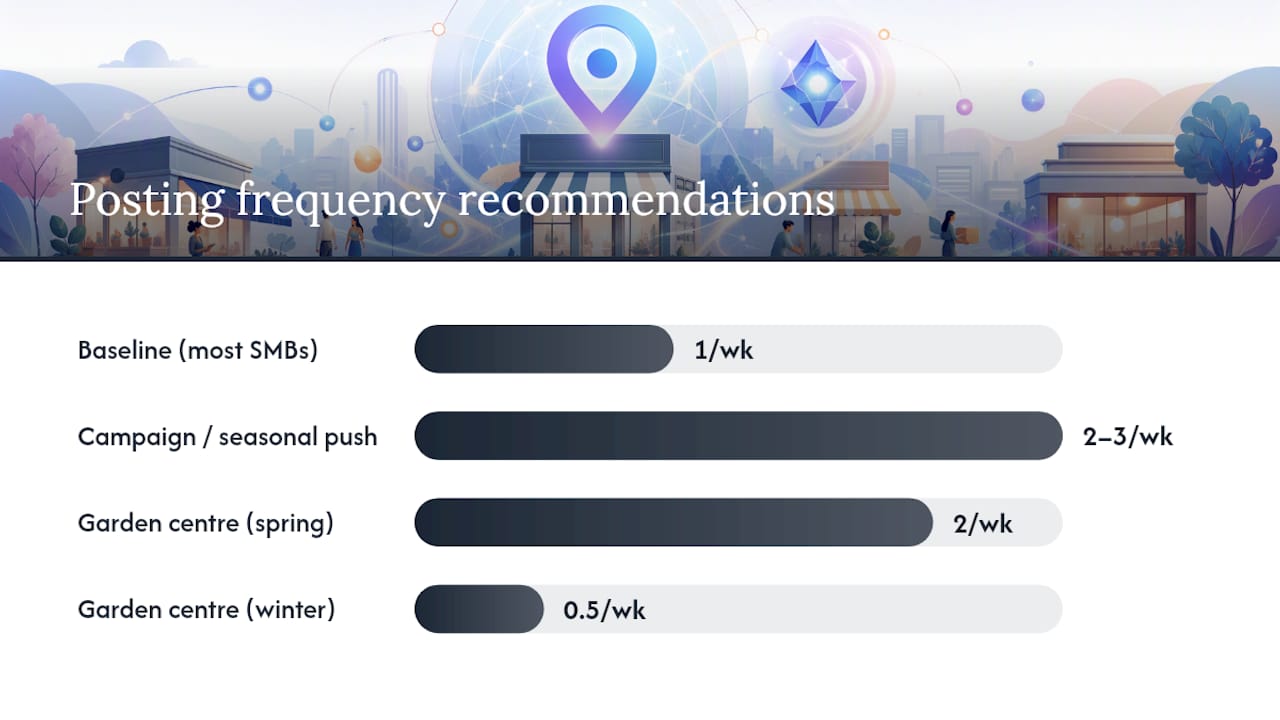
On timing: weekly posting is a sensible baseline for most small businesses, rising to two or three times a week around a specific campaign, seasonal event, or product launch. A garden centre might post twice weekly through spring and drop to fortnightly in winter. A restaurant might tie posts to specific dates like Valentine’s Day bookings or a bank holiday menu, publishing five to seven days ahead so the post has time to circulate before the date arrives.
Twenty post ideas you can adapt across most small-business types:
- New product or service arrival announcement
- Limited-time discount or bundle offer
- Behind-the-scenes team introduction
- Customer review highlight (with permission)
- Seasonal menu, stock, or service change
- Upcoming event or workshop invitation
- Extended or changed opening hours notice
- New location or refurbishment reveal
- Charity partnership or community involvement
- “How it’s made” process explainer
- FAQ answer turned into a standalone post
- Award, certification, or milestone celebration
- Staff training or new hire announcement
- Seasonal safety or preparation tips relevant to your trade
- Local event sponsorship or attendance
- Product comparison or “which one is right for you” guide
- Booking reminder ahead of a busy period
- Delivery area or service radius update
- Sustainability or sourcing story
- Thank-you post marking a follower or customer milestone
Repurposing existing social content saves genuine time here. A photo you posted to Instagram last week can become a Google post with minor copy adjustments, provided the image meets the resolution requirements above. If your social calendar already runs a monthly content plan, lift the strongest visual assets and adapt the caption length rather than starting from a blank page each time.
What content is restricted or prohibited on Google Business Profile posts?
Google enforces content rules strictly, and violations get posts removed or, in repeated cases, can affect your ability to post at all. The categories to know:
- Prohibited content includes anything sexually explicit, hateful, harassing, or dangerous, along with content promoting illegal products or services.
- Restricted content covers things like alcohol, tobacco, and gambling promotions, which face additional regional restrictions depending on where your business operates.
- Misleading claims about pricing, availability, or business identity are removed on sight once flagged.
- Low-quality images such as blurry photos, stock imagery presented as your own premises, or heavily watermarked graphics, often get rejected during review.
The rule that catches out the most small businesses is phone numbers in post text. Google treats a phone number typed into the post body as a spam signal, full stop, regardless of intent. Use the CALL CTA button instead, which routes to your verified number without breaking policy.
Separate from content you post yourself, Google sometimes suggests updates to your profile information, corrected hours, a new category, an amended address, based on signals it gathers independently. Owners receive a notification when this happens and should review it in the profile editor rather than leaving it unchecked. For businesses managing this at scale, the API surfaces these suggestions through a diffMask in the getGoogleUpdated call, showing exactly what Google wants to change before you accept or reject it. Auditing these regularly prevents incorrect data quietly overwriting the correct listing information over time.
If a post gets flagged or removed, check your email and the profile dashboard for the specific reason given, correct the issue (swap the image, remove a phone number, rewrite a misleading claim), and republish. Repeated violations can slow down how quickly future posts get approved, so treating the first rejection as a learning moment rather than a fluke pays off.
How do you measure whether your posts are working?
Google Business Profile gives you a native Insights panel showing three core metrics worth checking weekly: views (how many people saw the post), clicks (how many interacted with it), and CTA clicks specifically (how many pressed your button). Views tell you about reach; CTA clicks tell you about intent, and the gap between the two often reveals whether your copy or your offer is the weaker link.
A post with strong views but poor CTA clicks usually has a weak or unclear call-to-action, not a visibility problem. A post with low views regardless of quality suggests a timing or frequency issue rather than a creative one.
Native insights only tell half the story, though. To know whether a click actually became a booking or a sale, you need to connect the dots in Analytics:
- Tag every CTA link with UTM parameters before publishing, so traffic from that specific post shows up as its own source in Google Analytics.
- Set up a goal or conversion event on the landing page the CTA points to, whether that’s a booking form submission or an “order placed” confirmation.
- Compare conversion rates across post types over a month or two, Offers often convert differently to Update posts, and knowing the gap tells you where to invest more creative effort.
Simple A/B tests are worth running rather than assuming you already know what works. Publish two similar Offer posts a fortnight apart, one with a discount percentage in the headline, one leading with a benefit statement, and compare CTA click rates. Swap a product photo for a lifestyle image showing the product in use and watch whether clicks shift.
Pro Tip: Keep a simple spreadsheet logging post date, type, image used, CTA, and week-one click count. After ten or twelve posts, patterns emerge that are invisible if you’re relying on memory alone.
What do the 2026 API and Gemini updates mean for your posting workflow?
The biggest practical shift for small businesses this year is Gemini’s direct connection to Google Business Profile, announced as part of Google’s broader push to fold AI assistance into everyday business tools. In plain terms, Gemini can now draft replies to customer reviews, suggest profile updates, and surface insights about how your profile is performing, all referencing your actual, real profile data rather than generic templates.
For a business owner juggling posting, replies, and general upkeep alongside everything else running the company, this closes a real time gap. A drafted reply to a review still needs your read-through and personal touch before it goes live, but starting from a relevant draft rather than a blank box saves the minutes that add up across a busy week.
On the developer side, the Business Information API continues to expand what’s automatable. Teams building or managing profiles at scale can create posts programmatically, and, just as importantly, can review and act on Google’s suggested updates rather than discovering a changed address or category weeks after the fact.
A practical checklist for anyone connecting new tools to their profile this year:
- Confirm which team member owns final approval on AI-drafted replies before switching any auto-suggestion feature on.
- Set a recurring calendar reminder, weekly is sensible, to check for Google-suggested profile updates rather than relying on email notifications alone.
- If using the API, build a review step into your workflow so suggested changes get checked against your actual business records before acceptance.
- Treat Gemini’s draft output as a starting point, not a finished reply, particularly for negative reviews where tone matters enormously.
None of this replaces the fundamentals: a keyword like “Gemini integration” only pays off if your underlying profile information, hours, category, address, is accurate to begin with. Automation speeds up good habits; it doesn’t fix bad data.
Fylde Digital’s playbook: templates and what to expect
Two templates we return to often because they consistently perform, adapted to your specific business:
Template one, the limited-window offer:
Body: “Book before Sunday to claim your discount. Spaces are limited, and this offer won’t repeat next month.” CTA: BOOK or SHOP.
Expected outcome: Offer posts with a genuine deadline typically outperform open-ended discounts on CTA click-through, because urgency does real work here.
Template two, the seasonal service reminder:
Headline: “Getting ready for [season/event]? We can help.”
Body: “[Two sentences on the specific problem this solves, e.g. boiler servicing before winter, garden tidy before spring].” CTA: LEARN_MORE or CALL.
Expected outcome: These posts work best published seven to ten days before the seasonal peak, giving customers time to act before demand spikes and availability tightens.
Building a posting habit that actually sticks, rather than one that fizzles out after a fortnight, usually comes down to having a repeatable system rather than reinventing the wheel every week. That’s the thinking behind Fylde Digital’s Google Business Profile optimisation playbook, which sets out a full 2026 approach to profile management for small and medium-sized businesses.
Photography quality matters more than most owners initially assume; a post with a genuinely sharp, well-lit image consistently outperforms one with a phone snap taken in poor light, and practical guidance on commercial photography for small businesses is worth a read if your visual content has been an afterthought until now.
Our first-person take: how we actually use GBP posts in client campaigns
We treat Google Business Profile posts as a supporting channel, not the main event, and that distinction shapes how often we recommend clients use them. Posts work best alongside a properly optimised profile and a functioning website; they rarely carry a weak local presence on their own.
A cadence we’ve found effective for retail and hospitality clients runs one Update post weekly, one Offer post monthly tied to a specific promotion, and Event posts published as needed around real dates. Clients running this pattern consistently over several months tend to see steadier profile engagement than those posting sporadically in bursts, which matches what Google itself says about active profiles supporting local prominence.
One caveat worth being upfront about: posts are not a substitute for genuine local SEO work, backlinks, citations, review management, and a well-structured website. Treating them as a magic fix leads to disappointment. Treating them as one honest, low-effort layer in a wider strategy is where they earn their place.
— tibor
How Fylde Digital can help with your Google Business Profile
Fylde Digital offers a team fluent in local SEO, content creation, and profile management to support your Google Business Profile, providing an alternative to hiring an in-house social media manager. If reading through the posting rules, API options, and measurement steps above has made clear how much ongoing attention a profile genuinely needs, that’s precisely the gap our team fills for small and medium-sized businesses.

Our work includes profile audits checking current setups against Google’s policies, content calendars tailored to seasonal schedules, and local SEO support connecting posting activity to broader website and search visibility. An initial audit reviews existing posts, image quality, CTA usage, and category accuracy to identify quick wins and longer-term improvements.
If you’d like a clearer picture of what a properly managed profile and website could do for your enquiries, our web design service for Blackpool businesses is a sensible starting point for a conversation about where your online presence currently stands and what improving it would involve.
Sources
For direct reference, Google’s guide to creating posts covers the platform’s own instructions, while its local ranking guidance explains the relevance, distance, and prominence factors behind visibility. Developers managing profiles at scale should bookmark the Business Profile API documentation for handling suggested updates programmatically. For a broader local growth approach, Fylde Digital’s local SEO strategy guide rounds out the picture beyond posts alone.
- Tips to improve your local ranking on Google – Google Business Profile Help
- Gemini app features for businesses — Google Blog