Any agency worth hiring gives you a branded client portal, clear channel rules by message type, and a reporting dashboard from day one. The result: fewer “any update?” emails, faster approvals, and a working relationship where you spend your time making decisions rather than chasing status. Structured client portals can significantly reduce inbound status-update emails within the first month of adoption. Ask any agency you are evaluating to show you a live portal demo before you sign.
What to expect from any agency engagement:
- A branded client portal where you submit requests, check progress, and access files
- Agreed communication channels mapped to message type, set at kickoff
- An onboarding process that defines roles, access levels, and response SLAs
- A reporting cadence: weekly summaries and monthly KPI dashboards
- Measurable early impact, typically a clear reduction in inbound status queries within the first month
A client portal is a secure, branded space where clients can submit requests, check project status, access files, and communicate with the agency team — all without sending another email asking “what’s the status on…”
Table of Contents
- What do project management tools for agencies actually mean?
- Why does a client-facing system matter to your business?
- What core elements should an agency’s system include?
- How should an agency roll out this system?
- What questions should you ask an agency about how they manage projects?
- How Fyldedigital runs client-facing project management
- Key takeaways
- Why client portals are a strategic choice, not just an admin upgrade
- Fyldedigital’s free review covers exactly this
- Useful sources and further reading
What do project management tools for agencies actually mean?
Most people searching this phrase are not looking for a software product review. They want to know how a professional agency organises and communicates about their work. The correct term for this is a client-facing project-management system: a connected set of tools and disciplines that gives you visibility into your project without requiring you to dig through email threads or shared drives.
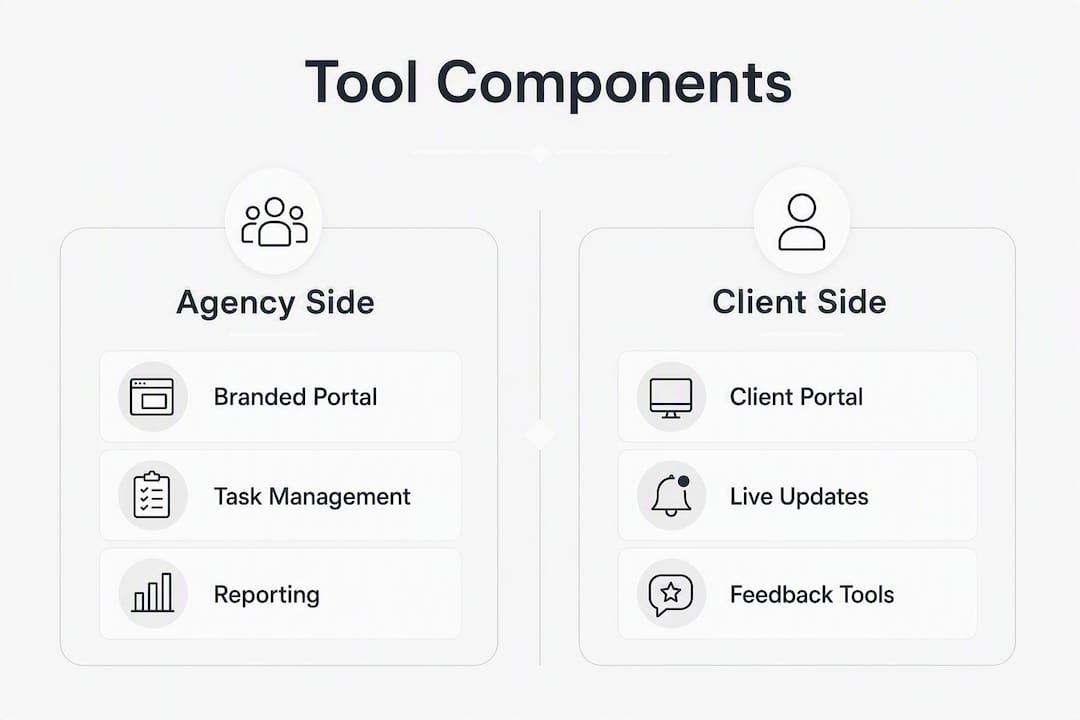
A well-built system has four components:
- Branded client portal: a secure, logged-in space carrying the agency’s branding, where all client-facing activity lives
- Curated client views: simplified status screens that show deliverables and next steps, not internal task noise
- Request intake forms: structured forms that capture briefs, change requests, and approvals in one place
- Reporting layer: dashboards and scheduled reports that surface KPIs without you having to ask
The table below maps each component to the people who interact with it and the level of visibility each party needs.
| Component | Agency side | Client side | Visibility level |
|---|---|---|---|
| Branded portal | Account manager, project lead | Business owner, approver | Full client view |
| Task board | Project lead, delivery team | Not shown | Internal only |
| Request intake | Account manager | Business owner | Shared |
| File library | Project lead | Approver | Shared with version control |
| Reporting dashboard | Account manager | Business owner | Read-only client view |
| Secure messaging | Account manager | Business owner | Shared |
Why does a client-facing system matter to your business?
The practical benefits go well beyond convenience. High-performing UK agencies are moving away from email for project communication and replacing it with dedicated portals and agreed channel rules. For you as a client, that shift translates into four concrete gains:
- Time saved: fewer back-and-forth emails means your account manager spends more time on your work
- Faster approvals: a structured approvals workflow in the portal removes the delay of chasing sign-off by email
- Fewer scope disputes: written request forms and a file library with version control create a clear record of what was agreed
- Billing clarity: retainer and hour visibility in the portal means no surprises on the invoice
Portal ROI for agencies includes time recovered from repetitive communication, improved client retention, and revenue protection through tracking previously unbilled hours. Small agencies have reported recovering multiple hours per week after adoption. Self-service portals typically achieve 70–80% client adoption in the first month when made the default channel, which means the efficiency gains arrive quickly rather than after months of bedding in.
There is also a positioning effect. A branded client portal signals professional operations and raises perceived value. Clients who feel well-served refer others. That referral effect is one reason the best agencies treat their client-facing system as a commercial asset, not just an admin tool.
What core elements should an agency’s system include?
A client portal should include request management, real-time status tracking, file sharing with version control, retainer visibility, and secure messaging as core features. Each one serves a specific purpose in your day-to-day relationship with the agency.
The essential features:
- Structured request forms: capture briefs and change requests with all required detail upfront, eliminating the back-and-forth of incomplete briefs
- Status tracking: real-time view of where each deliverable sits, updated by the team rather than reported on request
- File library with versioning: one location for all assets, with a clear record of which version is current
- Retainer and hour visibility: live view of hours consumed versus contracted, so billing conversations are grounded in data
- Approvals workflow: a formal sign-off step inside the portal, not buried in an email thread
- Integrations: a portal that connects to existing workflows such as email, Slack or Microsoft Teams, time tracking, and invoicing avoids creating additional silos and keeps client-facing status accurate
Reporting cadence — what to expect and when:
- Weekly summary: task progress, completed items, blockers, and next week’s priorities
- Monthly KPI dashboard: channel performance, SEO rankings, ad spend versus return, or social engagement, depending on your service
- Milestone report: delivered at each project stage (e.g. design sign-off, site launch, campaign go-live)
Channel matrix — how message type should map to channel:
| Message type | Recommended channel | Rationale |
|---|---|---|
| Urgent operational issue | Slack or Microsoft Teams | Immediate visibility for both parties |
| Project approvals | Client portal | Creates a formal, auditable record |
| Contracts and fees | Provides a legal paper trail | |
| Status updates | Portal dashboard | Asynchronous; no meeting required |
| Brief or change request | Portal intake form | Captures all required detail upfront |
Live working sessions should not be status meetings. Status flows asynchronously through the portal; live time is reserved for decisions and creative reviews.

How should an agency roll out this system?
An operations system should include intake and brief capture, task and delivery tracking, and a structured client-communication layer. The rollout sequence matters as much as the tools chosen.
Rollout checklist:
- Configure the portal with agency branding, intake forms, and permission levels
- Integrate with the agency’s project-management workflow, time-tracking, and invoicing tools
- Select 2–3 pilot clients and run a short walkthrough call with each
- Make the portal the default channel for all requests and updates
- Route all new client onboarding through the portal from day one
| Stage | Timing | Key activity |
|---|---|---|
| Setup | Days 0–7 | Branding, forms, integrations, permissions |
| Pilot | Weeks 2–4 | 2–3 clients, walkthrough calls, feedback loop |
| Broader rollout | Month 1 | All active clients onboarded |
| Optimisation | Months 2–3 | Refine forms, reporting templates, SLAs |
Starting with 2–3 pilot clients before a full rollout is best practice. It surfaces configuration issues before they affect your entire client base.
Metrics to track:
- Reduction in inbound status-update emails (target: measurable drop within month one)
- Portal adoption rate (target: 70–80% of clients logging in within month one)
- SLA compliance rate on response times
- Average time-to-approval for deliverables
What questions should you ask an agency about how they manage projects?
These questions separate agencies with a real system from those relying on email and good intentions.
- “Can you show me a live portal demo?” A good answer: a working demo with your branding applied. A weak answer: “We use email and shared Google Drive.”
- “How do you handle change requests?” Good: a structured intake form that captures scope, timeline impact, and cost. Weak: “Just drop us an email.”
- “What are your response SLAs, and where are they documented?” Good: written SLAs in the engagement letter and visible in the portal. Weak: “We’re always pretty quick.”
- “How is client data stored and who has access?” Good: named data-storage location, role-based access controls, GDPR-compliant setup. Weak: vague reassurance with no specifics.
- “What does onboarding look like in the first 60 days?” Good: a defined schedule of walkthrough calls, a kickoff document, and a communication-rules agreement. Weak: “We’ll send you a login.”
- “Is client portal access included in your fee?” Good: clear answer either way. Weak: no clear answer or a surprised pause.
Red flags to watch for:
- No portal or demo available at pitch stage
- Reliance on email only for all communication types
- No written onboarding plan or SLA document
- No role-based access controls or GDPR statement
- No defined reporting cadence
- “We use standard tools” with no specifics when pressed
Pro Tip: Ask to speak with one of the agency’s existing clients about their portal experience. An agency confident in its system will make that introduction without hesitation.
How Fyldedigital runs client-facing project management
Fyldedigital treats the client-facing system as part of the service, not an afterthought. Every new client engagement begins with a structured kickoff that defines communication channels by message type, assigns approval owners, and sets response SLAs in writing. The engagement letter doubles as a living kickoff document, which means communication rules and request management are agreed before any work begins.
The approach covers:
- A branded portal configured before the first deliverable is due
- Intake forms for all briefs, change requests, and approvals
- Weekly progress summaries and monthly performance dashboards covering SEO rankings, ad spend, and social performance
- Role-based access so the right people see the right information
Fyldedigital’s portfolio and client testimonials reflect a consistent pattern: clients report clearer visibility, faster approvals, and fewer back-and-forth emails from the first month of engagement.
Clients who want to evaluate Fyldedigital’s approach before committing can request a free website and SEO review, which covers portal readiness, onboarding process, and reporting cadence.
Key takeaways
A well-run agency gives you a branded client portal, disciplined channel rules, and a reporting cadence from day one — and the measurable result is fewer status emails and faster approvals within the first month.
| Point | Details |
|---|---|
| Client portal is non-negotiable | Any agency should demo a branded, secure portal before you sign. |
| Channel rules prevent chaos | Message types should map to specific channels, agreed at kickoff in writing. |
| Onboarding defines the relationship | A written SLA and 60-day onboarding plan reduce churn risk materially. |
| Adoption is measurable | Target 70–80% portal adoption and a clear drop in status emails within month one. |
| Fyldedigital’s approach | Fyldedigital configures portals, intake forms, and reporting dashboards before the first deliverable, with SLAs documented in the engagement letter. |
Why client portals are a strategic choice, not just an admin upgrade
The conventional wisdom is that client portals save time. That is true, but it undersells the real argument. A portal changes the power dynamic in the relationship. When clients can check status themselves, they stop chasing. When approvals live in a formal workflow, scope creep has nowhere to hide. When billing is visible in real time, invoice disputes become rare rather than routine.
The agencies that resist portals usually cite complexity or cost. Neither holds up. The setup effort is front-loaded and modest; the ongoing time saving is compounding. The cost of not having one, measured in account-manager hours spent on status calls and the client attrition that follows poor communication, is consistently higher.
For UK SMB owners, the practical test is simple: if an agency cannot show you a working portal at pitch stage, their internal operations are probably not much better organised. A well-structured agency workflow is visible from the outside. You do not need to take it on faith.
Data security deserves a sentence here. Any UK agency handling your project data should store it on GDPR-compliant infrastructure with role-based access controls and a clear data-processing agreement. Ask for it in writing.
Fyldedigital’s free review covers exactly this
If you are currently evaluating agencies or reviewing an existing relationship, Fyldedigital offers a free website and SEO review that includes an assessment of how your project would be managed: portal readiness, onboarding checklist, and reporting cadence. It is a practical way to see the operational standard before you commit.
The review takes under an hour and gives you a clear picture of what a well-run agency engagement looks like in practice. To book, visit Fyldedigital’s web design and digital services page or contact the team directly through the website. You will leave with a concrete checklist of what to expect and the right questions to ask any agency you speak with next.
Useful sources and further reading
- Client Portals for Agencies: The Complete 2026 Guide
- Client communication best practices
- Fyldedigital — free website and SEO review