The Google Verified badge is a trust signal displayed beside service providers in Google Local Services Ads results, confirming that Google has screened the business for identity, insurance, and relevant licences. For UK small businesses in home services and trades, it is genuinely worth pursuing if you operate in an eligible category — it reduces the friction a customer feels before picking up the phone.
Many verified providers report an uplift in click-through rates as a key benefit, particularly in higher-ticket trades where customers are cautious about who they let through the door. The badge does not replace a strong reputation or a well-built website, but it does add a layer of credibility that competitors without it simply cannot match at the search results stage.
Table of Contents
- How the Google Verified badge works in practice
- Is the Google Verified badge available in the UK?
- What does Google check during the verification process?
- How to apply for Local Services Ads and get verified in the UK
- Who benefits most from the Google Verified badge?
- What changed when Google rebranded to Verified?
- Other trust signals UK SMBs should use alongside the badge
- How Fyldedigital helps you get visible and verified
- Key takeaways
- The badge is a multiplier, not a magic fix
- Useful sources and official pages
How the Google Verified badge works in practice
When a potential customer searches for a local service on Google, Local Services Ads appear above standard paid results. Each listing shows the provider’s name, rating, and the green Verified badge — a clear visual cue that Google has screened the provider. On Google Assistant results, the badge appears in the same way, reinforcing trust at the point of voice search.

The pay-per-lead model is what separates Local Services Ads from standard pay-per-click campaigns. You pay only when a customer contacts you directly through the ad, not for every impression or click. That makes budget control more predictable for smaller businesses.
The core process flow:
- Google screens your business (background checks, insurance, licences)
- The Verified badge appears on your Local Services Ads listing
- Customers contact you directly via call or message through the ad
- Any disputes are handled through Google’s mediation process
Pro Tip: Keep your phone response rate high and your business categories accurate. Google’s algorithm favours responsive providers, and a mismatched category can suppress your listing entirely. Actively request reviews from satisfied customers through your Google Business Profile to strengthen your ranking within LSA results.
| Feature | Local Services Ads (Verified) | Standard Google Ads |
|---|---|---|
| Billing model | Pay per lead | Pay per click |
| Trust badge | Google Verified badge | None |
| Verification required | Yes | No |
| Typical placement | Above paid search results | Below LSA results |
Is the Google Verified badge available in the UK?
The Google Guarantee programme and its successor, the Google Verified badge, are available in the United Kingdom, though coverage is not uniform across every trade category or region. Google has expanded the programme progressively, and availability for specific business types continues to evolve. Before investing time in an application, confirm your category is currently eligible on Google’s Local Services Ads support pages.
Before applying, UK business owners should confirm:
- Your business category is listed as eligible for Local Services Ads in the UK
- You hold the relevant professional licences or accreditations for your trade (Gas Safe registration, NICEIC certification, and so on)
- Your public liability insurance is current and meets Google’s minimum requirements
- You have an active, verified Google Business Profile with at least a handful of genuine reviews
- Your business registration details match across all Google accounts
| Eligibility factor | Why it matters |
|---|---|
| Business category | Not all trades are currently eligible in the UK |
| Professional licences | Google checks trade-specific credentials |
| Insurance | Proof of valid cover is required at verification |
| Google Business Profile | Linked profile strengthens your application |
| Reviews | Low or absent reviews can delay approval |
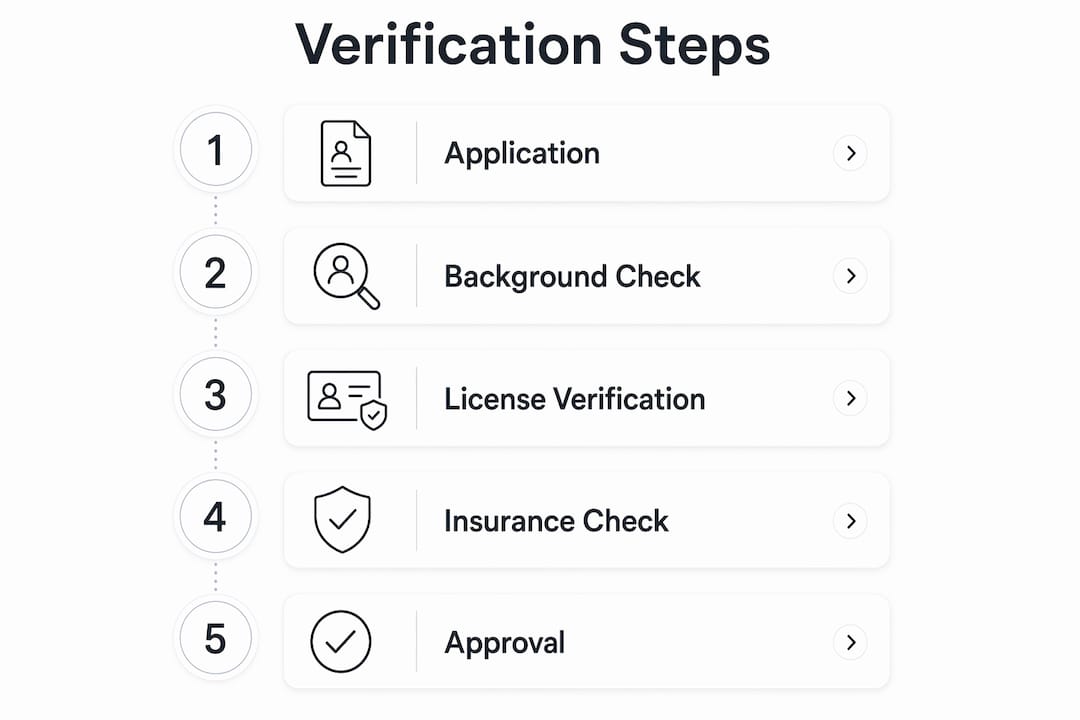
What does Google check during the verification process?
Google’s screening and verification process covers several distinct areas, and the exact requirements vary by business category and location. For UK applicants, the checks typically include business registration, professional licences, proof of insurance, and background checks on business owners or key staff.
| Verification item | What Google checks | Typical timeline |
|---|---|---|
| Identity and business registration | Companies House number or sole trader details | 1–3 days |
| Professional licences | Trade-specific credentials (e.g. Gas Safe, NICEIC) | 3–7 days |
| Proof of insurance | Public liability certificate | 2–5 days |
| Background checks | Owner and staff criminal record checks | 3 days |
| Review verification | Minimum rating and review count | Ongoing |
Documents to gather before you apply:
- Companies House registration number or sole trader proof of identity
- Current public liability insurance certificate
- Trade licences or accreditation certificates relevant to your category
- Photo ID for all owners and any staff who will be listed
- Access to your Google Business Profile login
How to apply for Local Services Ads and get verified in the UK
Getting set up is straightforward if your documents are in order. The process generally takes a few weeks from initial sign-up to your first verified listing appearing in search results.
- Create or claim your Google Business Profile at business.google.com and verify your address.
- Visit the Local Services Ads sign-up page and select your business category and service area.
- Complete the business profile within the LSA dashboard, including hours, services, and contact details.
- Upload your verification documents — insurance certificate, licences, and identity documents for all relevant individuals.
- Submit background check consent for owners and any staff Google requires to be checked.
- Link your Google Business Profile to your LSA account so reviews carry across.
- Set your weekly budget and confirm your lead preferences (calls, messages, or both).
- Monitor your verification status in the LSA dashboard and respond promptly to any document requests.
Common hold-ups include expired insurance certificates, mismatched business names across documents, and delays in third-party background check processing. Build in a buffer before any planned campaign launch.
Pro Tip: Gather renewal dates for your insurance and licences now and set calendar reminders three months ahead. Google requires annual re-verification, and a lapsed document can pause your listing without warning.
Who benefits most from the Google Verified badge?
The badge delivers the clearest return for businesses where the customer’s perceived risk is high. A homeowner searching for a boiler engineer or an electrician wants reassurance before a stranger enters their home. The Verified badge addresses exactly that hesitation at the moment it matters most.
Businesses that tend to see the strongest benefit include high-ticket home trades (plumbers, electricians, heating engineers, roofers), locksmith and security services, and cleaning or pest control companies. For local lead generation, the badge acts as a filter that attracts more serious enquiries rather than casual browsers.
Ask yourself these questions before deciding:
- Do customers typically search Google before hiring you, or do you rely mainly on referrals?
- Is your average job value high enough that one or two extra leads per month justify the compliance effort?
- Do your competitors already hold the Verified badge in your area?
- Do you have the licences and insurance Google requires, or would you need to obtain them?
If your answers lean towards search-driven, higher-ticket work with licensed requirements, the badge is worth pursuing. If your business runs almost entirely on word-of-mouth and your average job value is low, the administrative overhead may outweigh the gain.
Pro Tip: Pair your Verified badge with a conversion-focused landing page that loads quickly on mobile. The badge drives the click; your website closes the enquiry. A slow or unclear landing page wastes every lead the badge generates.
What changed when Google rebranded to Verified?
In October 2025, Google rebranded the Google Guaranteed badge to the Google Verified badge, shifting the programme’s emphasis from a monetary consumer guarantee towards identity and licence verification. The change matters for how you set customer expectations.
The automatic money-back reimbursement that once sat at the heart of the Google Guarantee has been phased out in many categories. Google’s consumer reimbursement pages now describe a dispute and mediation process rather than a straightforward refund, with Google deciding resolutions at its discretion. The consumer-facing guidance makes clear that reimbursement is not guaranteed and is subject to eligibility criteria.
What this means for your business:
- Do not market the badge to customers as a money-back guarantee — that framing is no longer accurate
- Keep detailed records of job invoices, communications, and completion sign-offs in case of any dispute
- Review your public liability insurance to confirm it covers the scope of work you advertise
- Update any marketing materials that reference the old “Google Guaranteed” branding
Other trust signals UK SMBs should use alongside the badge
The Verified badge is one piece of a wider trust picture. Customers rarely rely on a single signal before committing to a service provider, so building multiple layers of credibility pays off across the entire customer journey.
Trust signals worth building alongside or instead of LSA verification:
- Google Business Profile: A fully completed, verified profile with regular posts and prompt review responses is the single highest-impact free action available to most UK SMBs. Pair it with a solid local SEO strategy to improve organic map pack visibility.
- Customer reviews: Platforms like Trustpilot and Checkatrade carry significant weight with UK consumers, particularly in home services. A strong Checkatrade profile, for example, signals vetted credentials to customers who may not even reach Google search.
- Industry accreditations: Gas Safe, NICEIC, NAPIT, TrustMark, and similar bodies provide third-party verification that resonates with customers and supports your LSA application simultaneously.
- Professional associations: Membership of trade bodies adds credibility at the decision stage and often appears in organic search results for your business name.
Pro Tip: A combined approach — LSA with the Verified badge, an active Google Business Profile, and a managed review strategy across Trustpilot or Checkatrade — consistently outperforms any single trust signal alone. Think of each layer as reducing a different objection the customer might have.
How Fyldedigital helps you get visible and verified
Getting the Verified badge is only half the job. The other half is making sure the traffic it generates actually converts into booked work.

Fyldedigital works with UK small businesses to set up and manage Google Ads for local businesses, including Local Services Ads configuration, category selection, and budget planning. The team also builds conversion-focused landing pages designed to turn badge-driven clicks into real enquiries, and handles local SEO to strengthen your organic presence alongside your paid listings. If your Google Ads account needs a health check before you commit to LSA spend, a Google Ads audit is a practical first step to identify wasted budget and missed opportunities.
Ready to make your business more visible to local customers? Get in touch with Fyldedigital to request a free discovery call and find out which trust signals will deliver the best return for your trade.
Key takeaways
The Google Verified badge is a practical trust signal for UK service businesses, but its value depends entirely on your trade, your search volume, and whether you back it with strong reviews and a website that converts.
| Point | Details |
|---|---|
| What the badge is | A Google-issued trust signal for screened providers running Local Services Ads. |
| Who benefits most | High-ticket home trades where customers perceive risk before booking. |
| Reimbursement has changed | The automatic money-back guarantee was phased out in October 2025; a mediation process now applies. |
| Combine trust signals | Pair the badge with Google Business Profile, Trustpilot or Checkatrade reviews, and trade accreditations. |
| Fyldedigital can help | Fyldedigital sets up Local Services Ads, builds converting landing pages, and manages local SEO for UK SMBs. |
The badge is a multiplier, not a magic fix
The businesses I see get the most from the Google Verified badge are not the ones who treat it as a shortcut. They are the ones who already have their fundamentals in place: a clean Google Business Profile, a decent volume of genuine reviews, and a website that does not make visitors work hard to find a phone number. The badge amplifies what is already there.
What concerns me is the number of trade businesses that pursue verification, pay for Local Services Ads, and then send all that traffic to a slow, cluttered website with no clear call to action. The badge earns the click. Your website earns the job. If those two things are not working together, you are leaving money on the table every single week.
My recommendation is always to audit your conversion path before you spend on visibility. Fix the landing page, get your reviews in order, and then activate the badge. That sequence consistently produces better results than chasing the badge first and patching everything else later.
Useful sources and official pages
Before applying, check the current programme rules directly with Google. Policies and category eligibility can change, and the pages below reflect the most authoritative guidance available.
- Google Local Services Ads overview: Explains the pay-per-lead model, badge display, and how to get started with LSA in the UK.
- Screening and verification requirements: Details the documents and checks Google requires, with notes on how requirements vary by category.
- Verification categories and badge definition: Google’s help centre definition of the Verified badge and what each verification type covers.
- Consumer reimbursement and dispute process: Explains how Google handles customer complaints and what the mediation process involves.
- Google Guarantee consumer page: Country-specific reimbursement limits and eligibility criteria for consumers.
Check these pages before submitting your application. Google updates eligibility categories periodically, and a category that was unavailable six months ago may now be open in your region.