Creative assets are the designed visual and multimedia materials that express your brand’s identity and drive your marketing strategy forward. They sit at the frontline of brand communication, creating emotional engagement, building brand recall, and ultimately pushing audiences toward action. Get them right, and your campaigns land. Get them wrong, and even a generous budget won’t save you.
What is the role of creative assets in marketing?
Creative assets are the tangible, production-layer files your team creates to deliver a brand’s message across every channel. Think photos, videos, motion graphics, audio tracks, design files, and copy drafts. They differ from brand assets, which are the stable, foundational elements like logos and colour palettes, and from marketing assets, which are the finished campaign outputs like ads and email campaigns. Brand, marketing, and creative assets each need distinct governance because they change at different rates and serve different purposes.
Their core purpose goes beyond looking good. Creative assets build emotional connections, reinforce brand recognition, and give audiences a reason to trust you before they’ve spoken to anyone on your team. They also carry a measurable function: in performance advertising, each asset is a testable and measurable unit that tells you what works and what doesn’t.
- Drive brand awareness and recall across digital and physical channels
- Create emotional engagement that moves audiences from interest to action
- Reinforce consistency in colour, tone, and messaging across every touchpoint
- Serve as the production layer between your brand identity and your live campaigns
- Generate learnable performance data when tagged and tracked correctly
What types of creative assets do marketers use?
Creative assets span a wider range than most business owners initially expect. Each type serves a distinct purpose within a campaign, and mixing formats well is often what separates forgettable content from something that actually sticks.
- Photography: brand shoots, product imagery, lifestyle shots, and event coverage
- Video: long-form brand films, short social clips, product demos, and user-generated content (UGC)
- Motion graphics and animation: looping brand elements, explainer animations, and animated social tiles
- Design files: source files in Figma, Illustrator, or InDesign, plus templates and layouts
- Copy and scripts: ad copy, voiceover scripts, headline variants, and messaging drafts
- Audio: branded audio, podcast recordings, voiceovers, and music beds
- Raw and source files: unedited footage and project files that feed into finished assets
One distinction worth keeping clear: raw footage and source files are creative assets even though they aren’t finished ads. Tagging and storing them properly makes them reusable, which cuts production costs on future campaigns considerably.
Pro Tip: Treat your source files with the same care as your finished assets. A well-labelled library of B-roll footage or design templates can shave days off your next campaign’s production timeline.

Why creative assets matter for brand consistency and ROI

Consistent use of creative assets across digital channels enables integrated, omnichannel brand experiences that reinforce recognition and trust. When your visuals, tone, and messaging align across your website, social media, email, and print, audiences begin to recognise you instinctively. That recognition compounds over time into loyalty.
The financial case is equally clear. Repurposing existing assets across channels reduces the need to commission new content from scratch, cutting both production time and agency spend. Teams that manage assets well launch campaigns faster and avoid the costly duplication that comes from disorganised file storage.
- Build brand trust through visual and tonal consistency
- Reduce production costs by repurposing assets across formats and channels
- Accelerate campaign launches by keeping approved files accessible
- Support multi-channel integration with a single, coherent creative library
- Drive higher engagement and conversion rates through quality, on-brand visuals
Product imagery is a direct driver of purchase decisions for online shoppers, linking visual creative assets to real commercial outcomes.
How to manage and optimise your creative assets effectively
A Digital Asset Management (DAM) system is the most practical solution to the challenge of asset fragmentation, which creates duplication risks and brand inconsistency when files are scattered across email threads, local drives, and shared folders. A DAM gives your team a single, searchable source of truth.
- Apply consistent naming conventions and descriptive metadata to every file
- Use version control so teams always access the most current approved asset
- Set permissions to protect sensitive files and prevent off-brand usage
- Conduct regular audits to archive outdated assets and retire expired campaigns
- Integrate your DAM with your content management system and project management tools
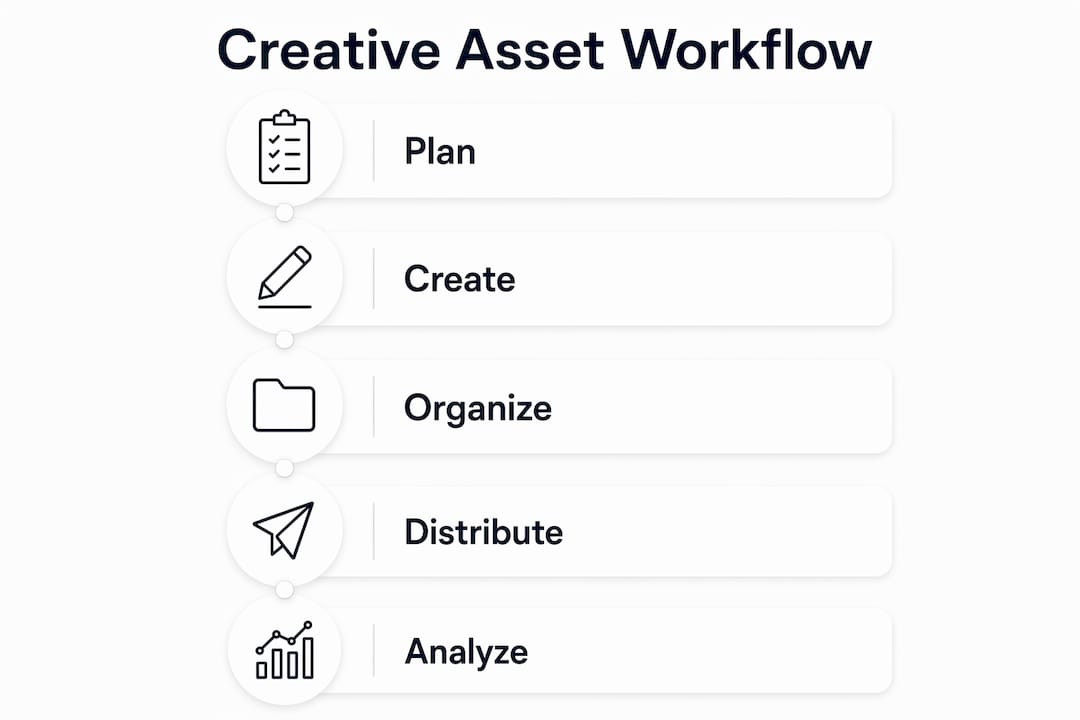
AI agents embedded in asset management platforms can save teams meaningful time each week by automating routine organisation tasks such as tagging, resizing, and format conversion. The creative asset lifecycle runs from creation and approval through distribution, repurposing, and eventual archiving. Managing each stage deliberately is what keeps campaigns relevant and budgets under control.
Pro Tip: Tag every asset with attributes like format, platform, and campaign concept at the point of upload, not retrospectively. Doing it later rarely happens, and the performance data becomes impossible to connect.
What does research say about creative asset effectiveness?
The evidence on creative asset performance challenges a common assumption: high production value does not automatically mean better results. Less polished but authentic assets can outperform high-production versions, with Google’s 2023 global advertising research suggesting that authentic creative can perform better than high-production versions. Fit-for-platform content, designed specifically for the channel where it appears, consistently outperforms repurposed material that wasn’t built with that platform in mind.
Tagging creative assets with attributes like ‘hook,’ ‘format,’ and ‘platform’ allows performance-driven teams to iterate and improve campaign results over time. This transforms asset management from a filing exercise into a genuine learning system.
Pro Tip: Treat each asset as a hypothesis. Run a video against a static, one hook against another, and let the data tell you which direction to scale.
Examples of creative assets driving campaign success
Creative direction in marketing shapes how assets come together into a coherent campaign. In practice, the most effective examples share a common trait: assets built specifically for their platform rather than adapted from another format.
A brand running paid social might produce ten hook variations from a single winning concept, each a distinct asset with its own performance data. A retail business might use lifestyle photography on its website, product shots in email campaigns, and short UGC clips on Instagram, all drawing from the same creative shoot but formatted for each channel’s visual language. The assets feel consistent because the brand elements remain stable, but each piece is tailored to where it appears.
Social media campaigns that use vertical video, bold typography, and minimal text consistently outperform those that repurpose horizontal formats. The reason is straightforward: audiences scroll fast, and assets designed for the feed stop the scroll more reliably than those designed for a billboard.
How do you measure the impact of creative assets on campaign ROI?
Measuring creative asset performance starts with connecting each asset to its results. Without that link, you’re guessing which visuals drove clicks and which ones were ignored. Key metrics to track include click-through rate, conversion rate, cost per acquisition, and engagement rate, broken down by asset type and format.
A well-tagged DAM makes this possible. When every asset carries metadata for format, platform, concept, and campaign, your reporting tools can surface which creative decisions actually moved the needle. Over time, this builds a record of what works, so each new brief starts from evidence rather than instinct. Tracking asset usage and performance within your workflow tools closes the loop between creative production and commercial outcomes.
Legal considerations and copyright issues for creative assets
Every creative asset your business uses carries legal implications, whether you produced it in-house or licensed it from a third party. Usage rights for licensed photography, music, and footage vary considerably. Some licences cover a single channel for a fixed period; others grant broader rights. Always confirm the scope before publishing.
For assets produced by freelancers or agencies, ensure your contracts specify that intellectual property transfers to your business on completion. Without that clause, the creator may retain rights to work you’ve paid for. Stock imagery licences typically prohibit certain commercial uses, so read the terms for each platform carefully. When using UGC, obtain written permission from the creator before repurposing their content in paid advertising. Keeping a permissions record within your DAM, alongside each asset, protects you if usage rights are ever questioned.
Fyldedigital works with businesses across the Fylde Coast and beyond to build professional web design and digital marketing strategies that put creative assets to work. If your brand’s visuals aren’t converting the way they should, get in touch for a free website review.
Key takeaways
Creative assets are the production and performance layer of your brand, and managing them well directly determines campaign consistency, speed, and ROI.
| Point | Details |
|---|---|
| Creative assets drive action | They build emotional engagement and brand recall, moving audiences from awareness to conversion. |
| Authentic beats polished | Google’s 2023 research found authentic assets deliver a 10% better conversion rate than high-production equivalents. |
| DAM systems prevent fragmentation | Centralising assets in a Digital Asset Management system eliminates duplication and protects brand consistency. |
| Tagging enables iteration | Attributes like format, platform, and concept connect each asset to its performance data for evidence-based improvement. |
| Legal clarity protects your business | Always confirm usage rights, IP ownership, and UGC permissions before publishing or repurposing any asset. |