A design system is a collection of reusable components, design tokens, and shared guidelines that serves as a single source of truth for design and engineering teams. The role of design systems goes well beyond visual consistency. Tools like Figma have made it practical for small to medium-sized businesses to build and maintain these systems without enterprise-level resources. When your designers and developers share the same components, naming conventions, and spacing rules, you eliminate the back-and-forth that slows every product release. The result is faster delivery, fewer defects, and a brand that looks and behaves consistently across every touchpoint.
What are the benefits of using design systems for SMBs?
Design systems have transitioned from cost centres to core business infrastructure that drives revenue growth, customer retention, and AI readiness. That shift matters enormously for small to medium-sized businesses, where every hour of duplicated work is a direct hit to the bottom line.
The efficiency gains are measurable and significant. Teams adopting design systems report onboarding times cut by 50% and rebrand cycles reduced from months to days after an initial setup period. For a product team of five or ten people, that kind of saving compounds quickly across every sprint.
“When your team stops rebuilding the same button for the third time, you start shipping features instead of fixing inconsistencies.”
Consistency is the other major win. When every screen shares the same colour tokens, spacing rules, and typography scale, customers experience a coherent product. That coherence builds trust, and trust converts browsers into buyers. Fewer visual discrepancies also mean fewer defect reports from QA, which frees your engineers for meaningful work.
The collaboration benefits are equally practical:
- Designers and engineers share a common vocabulary, reducing misinterpretation during handoff.
- Product managers can scope features more accurately when components already exist.
- New team members contribute faster because the system documents decisions that would otherwise live in someone’s head.
- Brand updates propagate automatically when tokens are adjusted at the source.
Design systems also position your product for AI integration. AI-enabled workflows rely on structured, well-documented component libraries to generate new UI reliably. A team without a design system will struggle to benefit from those tools.
What are best practices for implementing and governing a design system?
Governance is the part most teams skip, and it is the reason most design systems fail within eighteen months. Treating your system as a product, complete with a backlog, roadmap, changelog, and user feedback loops, is what separates systems that grow from systems that stagnate.
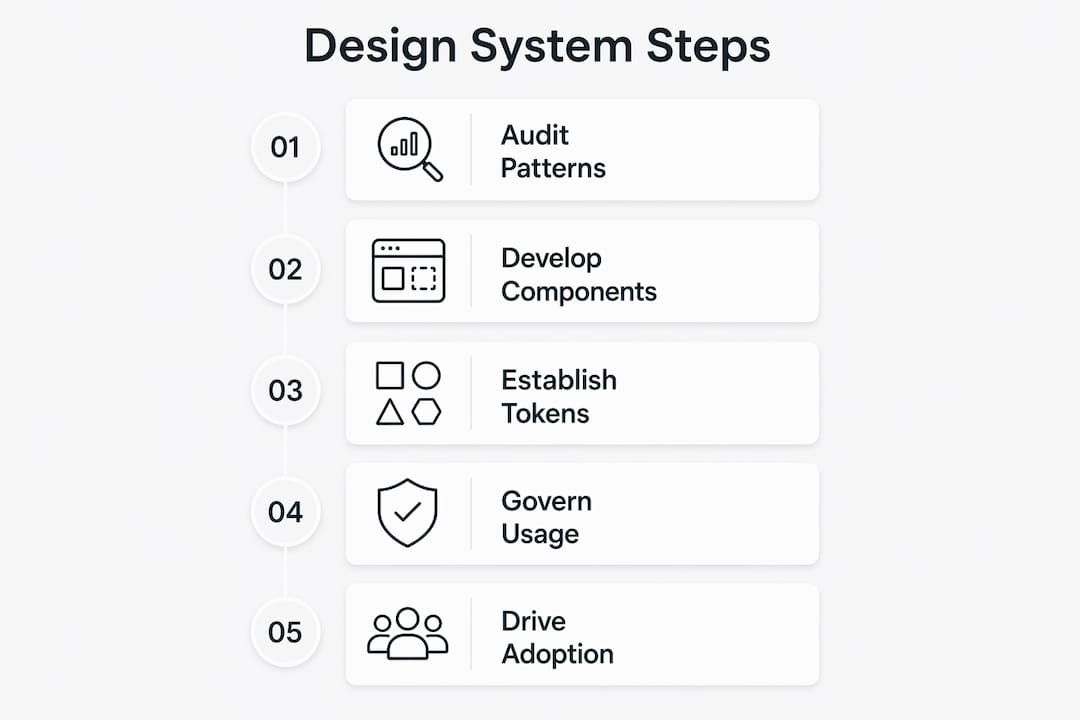
The following steps give your system the best chance of long-term success:
- Establish cross-functional ownership. Ownership at the intersection of design and engineering is the single biggest predictor of success. Systems controlled by only one discipline drift out of sync with the other.
- Implement semantic versioning and CI pipelines. Treat your component library like software. Version it, write migration guides, and set deprecation windows so teams can update without breaking production.
- Define naming conventions from day one. Standardised names and documented variants prevent component bloat and token drift, both of which become expensive to fix at scale.
- Create a clear contribution model. A rigorous contribution process that governs how components get proposed, reviewed, and merged prevents shadow systems from forming in individual team repositories.
- Document the “why”, not just the “what”. Recording the reasoning behind decisions helps future contributors maintain intent rather than accidentally undermining it.
Pro Tip: Start with the ten components your team uses most often. A small, well-governed system beats a large, undocumented one every time. Expand based on actual team requests, not assumptions.
Adoption is the final governance challenge. The “paved road” approach works best: make using the system demonstrably easier and higher quality than building custom components from scratch. When the system is the path of least resistance, adoption follows naturally.
Design systems vs style guides, UI kits, and component libraries
These four terms are often used interchangeably, but they describe very different things. Confusing them leads to underinvestment in the parts that actually matter.
| Tool | What it is | Who owns it | Primary purpose |
|---|---|---|---|
| Style guide | Static documentation of visual rules | Brand or marketing team | Communicate brand standards |
| UI kit | Design file with pre-built assets | Design team | Speed up mockups and prototypes |
| Component library | Coded, reusable UI building blocks | Engineering team | Consistent front-end implementation |
| Design system | Infrastructure combining all of the above with governance | Cross-functional team | Single source of truth for product development |
A style guide tells you what blue to use. A UI kit gives you a Figma button in that blue. A component library gives you the coded button. A design system connects all three, adds governance, and ensures they stay in sync as your product evolves.
Treating a design system as just a UI kit causes fragmentation. The design file diverges from the code, tokens get hardcoded, and the “system” becomes a collection of disconnected artefacts. The value of a true design system comes from the connective tissue: versioning, tokens, contribution models, and shared ownership.
How do design systems improve workflow for product teams?
Design tokens are the engine of workflow improvement. A token is a named variable that stores a fundamental design decision, such as a colour, a spacing value, or a font size. Tokens abstract design decisions from their implementations, so changing a brand colour or adjusting for accessibility compliance means updating one value rather than hunting through hundreds of files.

Industry standards recommend spacing and typography in strict multiples of 4px or 8px. This mathematical approach removes subjective spacing decisions from every component build and ensures your layouts meet web accessibility standards without additional effort.
Practical workflow improvements your team will notice immediately:
- Faster design handoff. Engineers receive components with defined tokens rather than static images, eliminating guesswork about spacing and colour values.
- Reduced design debt. Reusing existing components stops one-off solutions from accumulating into a maintenance burden.
- Consistent onboarding. A new designer or developer can read the system documentation and contribute meaningfully within days rather than weeks.
- Parallel working. Teams can build different features simultaneously without visual inconsistencies appearing at integration.
AI is now extending these benefits further. AI can generate new components from existing design system primitives, respecting spacing tokens and style patterns to accelerate feature creation. This only works when the underlying system is well-structured. A poorly documented system produces unreliable AI output. A well-governed one turns AI into a genuine productivity multiplier.
Pro Tip: Audit your current product for repeated UI patterns before building your system. Those patterns are your first components. Building from real usage data means your system solves actual problems from day one.
The digital marketing workflow improvements that come from design system adoption extend beyond product teams too. Marketing assets, landing pages, and campaign materials all benefit from shared tokens and components, keeping your brand consistent across every channel.
Key takeaways
Design systems function as shared infrastructure that connects design, engineering, and AI workflows, making them one of the highest-return investments a small to medium-sized business can make in its product development process.
| Point | Details |
|---|---|
| Cross-functional ownership | Systems fail when only one discipline controls them; shared ownership between design and engineering is non-negotiable. |
| Efficiency gains are measurable | Onboarding times can halve and rebrand cycles shrink from months to days after initial system setup. |
| Tokens drive consistency | Design tokens let you update colour, spacing, and typography across all components by changing a single value. |
| Governance prevents decay | Versioning, contribution models, and feedback loops keep a system alive and adopted long-term. |
| AI readiness requires structure | Well-documented design systems enable AI tools to generate reliable components, compounding team output. |
Why most design systems fail before they deliver value
The honest truth is that most small to medium-sized businesses build a design system and then treat it as a finished artefact. They create a Figma library, share a link in Slack, and assume the team will adopt it. They rarely do.
What I have seen work, consistently, is treating the system as a living product with real users: your designers, engineers, and product managers. That means running regular office hours where team members can ask questions, tracking which components get used and which get ignored, and updating the system based on what the team actually builds. The systems that survive are the ones with an advocate, someone whose job it is to make the system better every month.
The AI angle is worth taking seriously, but not for the reasons most articles suggest. AI does not replace the design process. It amplifies whatever structure you already have. If your tokens are inconsistent and your components are undocumented, AI tools will generate inconsistent, undocumented output at speed. The discipline of building a good system is the same discipline that makes AI useful.
My advice for any SMB starting out: resist the urge to build everything at once. Pick your ten most-used components, document them properly, and ship them. Then listen to your team. The requests that come back will tell you exactly what to build next. A small, trusted system beats a large, ignored one every single time.
— tibor
How Fyldedigital helps SMBs build consistent digital products
Building a design system is one part of a broader commitment to brand consistency and quality across your digital presence. For small to medium-sized businesses on the Fylde Coast and beyond, that commitment starts with a well-built website.

Fyldedigital specialises in web design for SMBs that reflects your brand accurately and performs reliably across every device. From conversion-focused layouts to mobile-first builds, the team understands how design decisions affect business outcomes. If you are ready to build a digital presence that works as hard as you do, explore Fyldedigital’s web design services or request a free website review to get started.
FAQ
What is the role of design systems in product development?
A design system is shared infrastructure that connects design and engineering teams through reusable components, tokens, and governance frameworks. Its primary role is to ensure consistency, reduce duplicated work, and accelerate product delivery.
How do design systems improve workflow for small teams?
Design systems reduce handoff friction, speed up onboarding, and allow parallel development without visual inconsistencies. Teams adopting them report onboarding times cut by 50% and rebrand cycles reduced from months to days.
What is the difference between a design system and a UI kit?
A UI kit is a design file with pre-built assets owned by the design team. A design system is cross-functional infrastructure that combines a UI kit, a component library, a style guide, and governance processes into a single source of truth.
What are the key elements of a design system?
The key elements are design tokens, a component library, a style guide, documentation, a contribution model, and a versioning process. Together, these elements keep design and engineering aligned as a product grows.
How do you ensure a design system gets adopted by the team?
Adoption follows when using the system is easier than building custom components. The “paved road” approach, where the system provides clear quality advantages, combined with regular advocacy and feedback loops, drives consistent use.