Claim and verify your Google Business Profile, complete every core field and pick a precise primary category. Do these three things first and you will see improved local visibility and more enquiries within weeks. Everything else in this guide builds on that foundation, and Google’s own local ranking guidance confirms relevance, distance and prominence all hinge on the accuracy of what you have submitted.
Two tasks you can finish today:
- Verify ownership — log into the Google Business Profile dashboard and confirm you hold admin access; if unverified, start the process now (allow 5 to 30 minutes).
- Lock your core fields — check your business name, address or service area, phone number, website and hours match exactly what appears on your own site’s footer.
Key Takeaways
Google Business Profile optimisation succeeds when verification, precise category selection and a weekly freshness cadence are treated as ongoing habits, not a one-time setup task.
| Point | Details |
|---|---|
| Verify first | Claim ownership and complete verification before touching any other field. |
| Category over content | The narrowest accurate primary category controls which searches you can appear in. |
| Description within 250 characters | Lead with what you do, who you serve, and one trust marker before truncation hits. |
| Cadence beats one-off effort | Weekly posts, monthly photos and quarterly category checks sustain visibility long-term. |
| Agency support when time runs short | Fylde Digital manages verification, media, reviews and monitoring as a done-for-you service. |
Table of Contents
- What does Google Business Profile optimisation actually involve?
- How do you choose the right category and write a description that gets found?
- Which photos and posts actually move the needle?
- How do you build review velocity and manage negative feedback?
- What metrics should you check and how often?
- What separates a well-run profile from an average one?
- Why the “set it and forget it” advice on GBP is wrong
- When should you hand Google Business Profile management to an agency?
- Frequently asked questions
- Sources
What does Google Business Profile optimisation actually involve?
It means making every field Google can rank, every photo Google can index, and every review Google can weigh, work harder for your listing. It is not a one-off setup task. It is a maintenance habit, and the businesses that treat it that way consistently outrank the ones that fill it in once and forget it.
How do you claim and verify your business correctly?
Verification proves to Google that you genuinely run the business, and the method offered depends on your business type and location. Postcard verification typically arrives within a few days to two weeks; phone and email verification, where offered, can confirm ownership quickly; video verification suits businesses without a fixed storefront, such as mobile tradespeople.
- Search your business name on Google, click “Own this business?” and follow the prompt to claim it.
- Choose whichever verification method Google offers for your category and location.
- Once verified, lock in your canonical NAP (name, address, phone) exactly as it appears on your website footer and any directory listings.
- Cross-check that format against every other place your business is listed online.
Inconsistent NAP across the web reads as a trust failure to Google’s systems, even when every version is technically correct. Pick one exact format, punctuation and abbreviation style included, and enforce it everywhere.
Pro Tip: Save your canonical NAP as a text snippet you paste into every directory submission. One inconsistent listing on a minor directory can quietly undermine an otherwise solid profile.
Confirm these fields immediately after verification: your registered business name (never stuffed with keywords), your address or defined service area, a local phone number, your website URL, and both your regular and seasonal hours.
How do you choose the right category and write a description that gets found?
Your primary category is the single strongest lever you control, according to practitioner analysis of GBP ranking factors — it determines which searches you are even eligible to appear in. Pick the narrowest option that accurately describes your core business, not the broadest one that sounds impressive. A “Wedding Photographer” who selects “Photographer” is quietly opting out of every wedding-specific search.
- Choose one precise primary category, then add two or three genuine secondary categories that reflect real services, never padding.
- List your actual services and products with brief descriptions and pricing where it helps conversion.
- Write your business description so the first 250 characters state what you do, who you serve, and one trust marker, because Google truncates longer descriptions in preview views even though the full field allows up to 750 characters.
- Keep the tone factual. Promotional language and links are not permitted in this field and can get flagged.
Pro Tip: Write your description as though a voice assistant might read only the opening sentence aloud. That is roughly what happens when it gets pulled into a summary.
Which photos and posts actually move the needle?

Fresh, well-chosen media does two jobs at once: it helps human searchers decide to click, and it signals to Google that the profile is actively managed. Listings with recent photo activity consistently show stronger engagement than static ones, per Shopify’s practical GBP guidance.
Prioritise these image types, refreshed monthly:
- Exterior shots so customers recognise the premises on arrival
- Interior shots that set expectations before a visit
- Team photos, which build trust faster than almost any other image type
- Work samples or completed projects, ideally with brief captions describing what was done
Use landscape orientation for cover and exterior shots, keep file sizes reasonable for fast mobile loading, and caption every upload with a short, descriptive sentence rather than leaving it blank. Publish a “What’s new” or offer-style Google Post weekly. Time seasonal or event-based posts to go live a few days ahead of the date they promote, so they have visibility before the moment passes.
How do you build review velocity and manage negative feedback?
Review velocity, meaning a steady monthly trickle rather than sporadic bursts, matters more to Google’s prominence signal than a single spike of five-star reviews. Ask at the moment satisfaction peaks: right after a job completes, a delivery arrives, or a service concludes, never through incentivised or bulk-blast requests, which breach Google’s policies.
- Send the review request within 24 hours of a positive interaction, by text or email, with a direct link.
- Reply to every review within a few days, positive or negative.
- For positive reviews, thank the customer by name and mention a specific detail from their comment.
- For negative reviews, acknowledge the issue, avoid defensiveness, and offer to resolve it offline with a phone number or email.
- Seed your Q&A section yourself with the three or four questions customers ask most, and answer them before someone else posts an inaccurate answer first.
Pro Tip: Turn on Google’s messaging feature and add a booking link if your business type supports it. Shortening the gap between “found you” and “spoke to you” is one of the cheapest conversion wins available on the entire platform.
A review strategy tailored to UK small businesses can help structure this system properly rather than leaving it to guesswork.
What metrics should you check and how often?
Google Business Profile Insights gives you seven numbers worth watching regularly: discovery queries (searches that found you by category, not name), profile views, website clicks, direction requests, phone calls, photo views, and review recency.
- Weekly: publish one post, reply to any new reviews, log one new photo.
- Monthly: add four to six fresh photos, run a full Insights audit, check hours and service list accuracy.
- Quarterly: review your category selection, attributes and full service list for drift or omissions.
| Cadence | Task |
|---|---|
| Weekly | One post, review replies, one new photo |
| Monthly | 4 photos, Insights audit, hours check |
| Quarterly | Category, attributes and service list review |
Most businesses see measurable movement in discovery queries and profile views within four to six weeks of a consistent cadence. If nothing shifts by week eight, re-check your primary category first, then examine whether your service area genuinely reflects where you can compete on distance, since that factor cannot be optimised away with content alone.
What separates a well-run profile from an average one?
Fylde Digital’s own client work bears this out repeatedly: it is rarely one dramatic change that shifts a profile’s performance, it is the compound effect of small, repeated actions.
- One local trades client combined a monthly photo refresh with a structured review request system and saw a measurable rise in phone calls within two months.
- A service-based client corrected a mismatched primary category that had quietly excluded them from their most valuable search terms for over a year.
The profiles that perform best are not the ones with the most features filled in once. They are the ones where someone checks back every single week.
Why the “set it and forget it” advice on GBP is wrong
Most guides on this topic front-load every task, as though optimisation were a checklist you complete once and move on from. That framing does readers a disservice. A profile with a beautifully written description and zero fresh photos since last spring will lose ground to a rougher-looking competitor who posts weekly and replies to reviews within a day.
The conventional wisdom overweights the setup phase and underweights the maintenance phase. Verification and category choice matter enormously, but they are one-time decisions. Review velocity and posting cadence are ongoing decisions, and they are where most businesses quietly drop the ball after week three.
If you only have an hour a month to spend on this, spend it on reviews and photos, not on rewriting your description for the fifth time. Category choice deserves your full attention once, correctly, at the outset. After that, the weekly and monthly cadence outlined above is the actual lever. Businesses that sustain it beat businesses that “optimised” once and stopped, almost every time.
When should you hand Google Business Profile management to an agency?
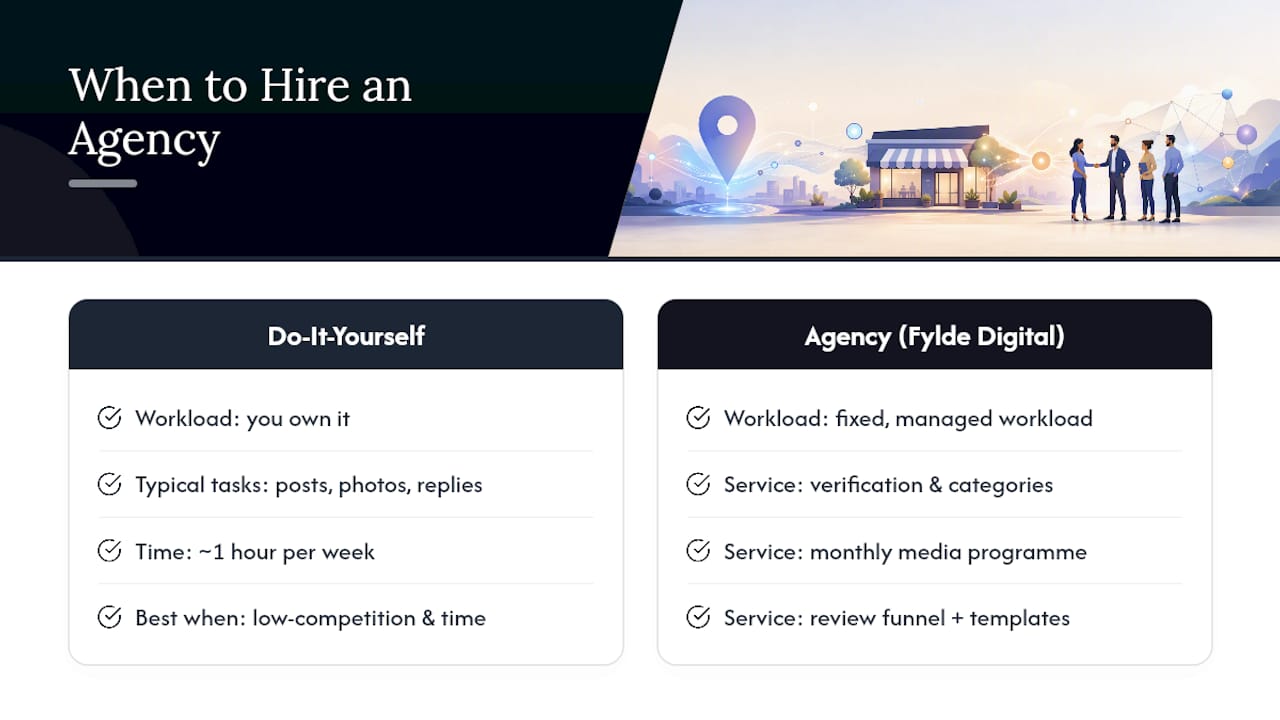
If you are running the business day to day, finding an hour a week for posts, photo uploads and review replies is often the first task that slips. That is the exact point where Fylde Digital becomes the more efficient route than doing it all in-house: instead of another task on your list, GBP management becomes a fixed, managed workload someone else owns.

Fylde Digital handles the full cycle: verification and category selection, a monthly media programme, a structured review funnel with response templates, and ongoing Insights monitoring so nothing drifts unnoticed. DIY works well if you have the time and a low-competition market. Hire out when your competitors post weekly and you do not, or when your enquiries have plateaued despite a technically complete profile.
If your business is in a competitive local market and your profile has not been touched in months, that is the clearest sign it is time to bring in support. Start with a free SEO and website review to see exactly where your current profile and site stand before committing to anything further.
Frequently asked questions
How long does Google Business Profile verification take?
Postcard verification usually takes 5 to 14 days. Phone, email or video verification, where available for your category, can confirm ownership within minutes to a few hours.
How often should I post on my Google Business Profile?
Aim for at least one Google Post per week, paired with several fresh photos each month, to maintain the engagement signals Google associates with active listings.
Can I change my primary category later?
Yes, and you should revisit it quarterly. A category that fit your business two years ago may now be excluding you from your most valuable searches.
Do I need to respond to every review?
Reply to every review within a few days wherever possible. Consistent responses, especially to negative ones handled calmly and offline, support both trust and prominence.