Every week, potential customers land on a business website, spend three seconds looking at it, and leave. They find a competitor instead. That competitor might not be better at the actual service, but their website communicates trust, clarity, and professionalism straight away. For small and medium-sized businesses, a poorly designed website is not just an aesthetic problem. It is a constant, silent drain on enquiries, leads, and revenue. The good news is that fixing it is entirely achievable when you follow the right process from the start.
Table of Contents
- Preparation: Essential tools and requirements
- Step-by-step process: Designing your business website
- Building in SEO and accessibility from the outset
- Testing, launch, and continuous improvement
- Why most business websites fail and how to do better
- Get expert help with your business website
- Frequently asked questions
Key Takeaways
| Point | Details |
|---|---|
| Plan before designing | Gather your requirements and tools so your project starts smoothly. |
| Build with SEO and accessibility | Incorporate SEO best practices and meet accessibility standards from day one for maximum impact. |
| Test and refine | Thorough pre-launch testing and ongoing improvements ensure your website stays competitive. |
| Consider professional support | Expert web designers can help avoid costly mistakes and unlock long-term growth. |
Preparation: Essential tools and requirements
With the value of a strong online presence firmly in mind, the first step is gathering the right resources before a single page is built. Jumping straight into design without preparation almost always leads to wasted time and costly revisions later.
Your first decision is choosing the right platform. WordPress remains the most widely used option, offering flexibility, strong SEO capabilities, and a vast ecosystem of plugins. Shopify suits businesses selling products online, while a bespoke build suits those with complex requirements or unique branding demands. Understanding the business website essentials early helps you make an informed platform choice rather than defaulting to whatever is easiest in the short term.
Before choosing a platform, map out your basic requirements clearly:
- Business goals: Are you generating enquiries, selling products, building a mailing list, or all three?
- Target audience: Who are your ideal customers, and what do they expect from a website in your sector?
- Branding assets: Do you have a logo, brand colours, and fonts already, or do these need to be developed?
- Content: Do you have photography, copy, and case studies ready, or do these need to be created?
Beyond planning, you will need practical tools in place before building begins. A registered domain name, reliable hosting, and an SSL certificate (the padlock in the browser bar) are non-negotiable. Good quality imagery, whether professional photography or licensed stock images, makes an enormous difference to how credible your site looks. Many business owners underestimate how much cheap or irrelevant imagery undermines an otherwise solid design.
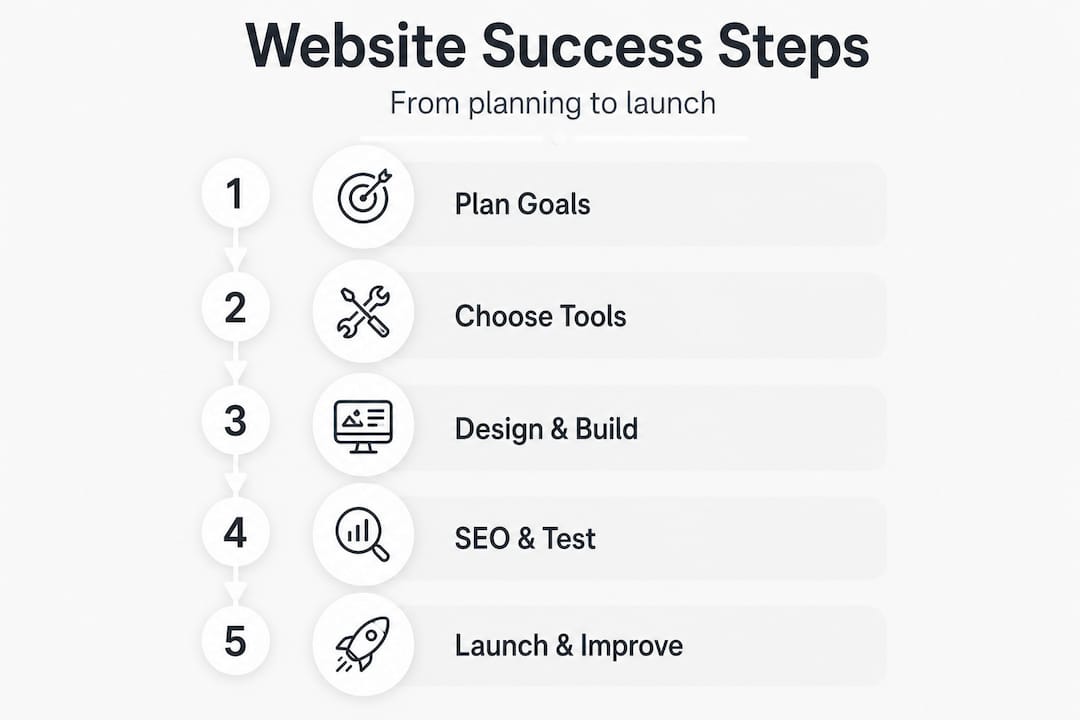
Here is a summary of the core requirements to have ready before starting:
| Requirement | Why it matters | Where to get it |
|---|---|---|
| Domain name | Your address online, affects brand trust | Registrars like GoDaddy or 123-reg |
| Hosting | Affects speed, uptime, and reliability | SiteGround, Kinsta, or WP Engine |
| SSL certificate | Secures data, required for Google trust | Usually included with hosting |
| Brand assets | Ensures visual consistency | Designer or brand kit |
| Quality imagery | First impression, builds credibility | Photographer or licensed stock |
| SEO keyword list | Guides content and structure | Google Keyword Planner |
Pro Tip: Choose a platform with built-in SEO settings and accessibility features. Integrating SEO from the start, including keywords, meta tags, alt text, and schema markup, and targeting Core Web Vitals compliance (LCP under 2.5 seconds) is far more efficient than retrofitting it later.
Step-by-step process: Designing your business website
Armed with your tools and a clear plan, you can now follow a structured approach to build a site that genuinely represents your business and converts visitors into customers.
-
Map your site structure. Decide which pages you need before designing anything. Most business websites require a home page, about page, services pages (often one per service), a contact page, and a blog. Mapping these out first prevents confusion and gaps later.
-
Choose your design approach. Templates offer speed and lower cost. A custom design for SMBs offers uniqueness, better branding alignment, and a layout built specifically around your customer journey. Both have merit depending on your budget and ambitions.
-
Design navigation with clarity. Your menu should allow any visitor to find what they need within two clicks. Overcrowded menus confuse people and push them towards the exit. Stick to five to seven main navigation items at most.
-
Prioritise mobile responsiveness. More than half of all web traffic now comes from mobile devices. A site that looks great on a desktop but breaks on a phone will cost you enquiries every single day. Mobile-first design is not a trend. It is a standard expectation.
-
Integrate SEO and Core Web Vitals compliance. SEO best practices such as clean URL structures, keyword-rich page titles, meta descriptions, and properly structured headings should be built into each page as you go. Aiming for Core Web Vitals compliance from day one means your site loads fast, responds quickly to user input, and remains visually stable.
-
Add conversion-focused features. Contact forms, click-to-call buttons, testimonials, trust badges, and clear calls to action all encourage visitors to take the next step. Do not make customers hunt for your phone number or enquiry form.
Here is a comparison of template and bespoke website design to help you decide:
| Feature | Template design | Bespoke design |
|---|---|---|
| Cost | Lower upfront cost | Higher upfront investment |
| Speed to launch | Faster | Longer build time |
| Branding fit | Generic, may need customisation | Tailored to your exact brand |
| SEO flexibility | Limited by template structure | Fully optimised from the ground up |
| Scalability | Can become restrictive | Scales with your business |
| Uniqueness | Shared with many other sites | Entirely your own |
A well-planned SEO website redesign is often the point at which businesses realise just how much they were leaving on the table with a template built years ago. Investing in the right structure from the outset pays dividends over the long term.
Building in SEO and accessibility from the outset
Once the visual design is underway, it is vital to address the elements that sit beneath the surface but drive real performance. SEO and accessibility are not optional extras. They are core to how your site performs and who it reaches.
From an SEO perspective, every page on your site should serve a purpose. That means keyword-rich content written for your target audience, properly tagged images with descriptive alt text, and structured data (schema markup) that helps search engines understand what your business does. Neglecting these at the build stage means going back and correcting them later, which costs time and money. Focusing on improving website UX alongside SEO creates a compounding effect. Google’s ranking algorithms increasingly prioritise sites where real users have a positive experience.
Accessibility is an area that many small businesses overlook entirely. Research shows that 94.8% of websites fail basic accessibility checks. That is an extraordinary figure. It means almost every website your competitors run is likely failing a significant portion of potential customers, including those with visual impairments, motor difficulties, or cognitive conditions.
Meeting WCAG (Web Content Accessibility Guidelines) standards requires:
- Colour contrast: A minimum ratio of 4.5:1 between text and background for normal text
- Keyboard navigation: Every interactive element should be reachable without a mouse
- Alt text: Every image must have a descriptive alternative text attribute
- Clear headings: Proper heading hierarchy (H1, H2, H3) helps screen reader users navigate
- Descriptive link text: “Click here” tells users nothing; “View our pricing page” tells them everything
“Accessibility is not just about compliance. It is about ensuring your website genuinely works for every potential customer who arrives at it. That is good business practice, not just good ethics.”
Pro Tip: Improving accessibility almost always improves SEO performance as well. Screen readers and search engine crawlers interact with your site in similar ways. If your site is easy for a screen reader to interpret, it tends to be easier for Google to index and rank.
Embedding accessibility checks into each stage of the design process is far less painful than running a single audit after launch and discovering hundreds of issues to fix. Tools such as WAVE and Google Lighthouse can be used at any point during the build to flag problems early.
Testing, launch, and continuous improvement
After integrating core functionalities, the final step before going live is rigorous testing followed by a commitment to ongoing optimisation. A launch is not the end of the process. It is the beginning.
Before going live, work through this pre-launch checklist:
- Test every link on the site to confirm none are broken or pointing to the wrong page
- Check mobile view across multiple devices, not just your own phone
- Run a speed test using Google PageSpeed Insights and aim for Core Web Vitals compliance with an LCP score under 2.5 seconds
- Submit all contact and enquiry forms to confirm submissions are received correctly
- Review SEO basics including page titles, meta descriptions, and the sitemap submission to Google Search Console
- Run an accessibility audit using WAVE or Axe to catch any remaining issues
The table below summarises which tasks are one-off launch activities and which require ongoing attention:
| Task | One-off at launch | Ongoing |
|---|---|---|
| Domain and hosting setup | Yes | No |
| Core Web Vitals optimisation | Yes (initial) | Review quarterly |
| Content creation | Yes (initial) | Monthly updates |
| SEO keyword targeting | Yes (initial) | Review every quarter |
| Accessibility audit | Yes (initial) | Annually at minimum |
| Analytics review | No | Monthly |
| Blog and news updates | No | Regularly |
| Security updates | No | Ongoing |
Reviewing your analytics through Google Analytics 4 and website UX improvements data will reveal which pages are underperforming, where visitors are dropping off, and which content is driving the most enquiries. Acting on this data consistently is what separates businesses whose websites grow with them from those whose sites quietly stagnate.
“A business website is never finished. Continuous tweaks win more customers.”
Regular content updates signal to Google that your site is active and relevant. A business that publishes a genuinely helpful blog post every few weeks will steadily outperform a competitor with a static site, even if both started from the same point.
Why most business websites fail and how to do better
There is a pattern we see repeatedly. A business owner puts a website together with good intentions. It looks reasonable on the day it launches. Then the months pass, traffic does not materialise, enquiries stay flat, and eventually the site becomes an embarrassment rather than an asset. The business owner wonders what went wrong.
The answer is almost always the same. The site was built to look like a website rather than to perform like one. Too much attention went on fonts and colours, and too little went on site structure, SEO, user journey, and business-winning web design principles that actually convert visitors.
DIY platforms have made it easier than ever to build something that appears functional. But appearing functional and actually driving leads are very different things. A DIY build often misses technical SEO requirements, fails accessibility standards (sometimes creating legal risk), and lacks the conversion-focused structure that turns browsers into buyers. The business owner may not realise any of this until they compare their results with a competitor who invested properly.
The uncomfortable truth is that treating a website as a one-time expense rather than an ongoing business asset is one of the most common and costly mistakes in small business marketing. Your website is often your first salesperson. It is working every hour of every day. It deserves the same investment and attention you would give to any other part of your business that directly influences revenue.
Investing in professional support early, whether for the initial build or a strategic redesign, can save years of missed opportunities. The cost of doing it right upfront is almost always lower than the cost of lost business over time.
Get expert help with your business website
You now have a clear framework: from preparation and platform choice through to SEO, accessibility, testing, and ongoing optimisation. Following these steps will put you well ahead of the majority of small business websites currently live in the UK.

But knowing the process and executing it well are two different things. At Fylde Digital, we work with businesses across the Fylde Coast and beyond to create websites that genuinely perform. Whether you need web design services built around your brand from scratch, or a strategic website redesign that fixes what is not working, we bring the technical depth and marketing expertise to make it count. Request a free website review today and find out exactly where your site stands and what it could be doing better.
Frequently asked questions
What is the most important factor in designing a business website?
Optimising both user experience and search engine visibility from the very beginning is essential. Integrating SEO from the start, including keywords, meta tags, alt text, and schema markup, alongside targeting Core Web Vitals compliance, gives your site the strongest foundation for attracting and converting customers.
How do I make my business website accessible?
Use high-contrast colours with a minimum ratio of 4.5:1, provide descriptive alt text for all images, and ensure your entire site can be navigated using a keyboard alone to meet WCAG standards.
Do I need to hire a web designer or can I use DIY platforms?
DIY platforms are suitable for very basic online presences, but professional designers consistently deliver stronger results for branding, technical SEO, accessibility compliance, and conversion-focused layouts that turn visitors into customers.
What should I test before launching my new business website?
Test for mobile responsiveness across multiple devices, Core Web Vitals compliance with an LCP under 2.5 seconds, proper SEO basics, broken links, form submissions, and a full accessibility audit before going live.
How often should I update my business website?
Review your content, SEO performance, and Core Web Vitals at least every quarter to keep your site competitive, accurate, and aligned with how your business and customers continue to evolve.