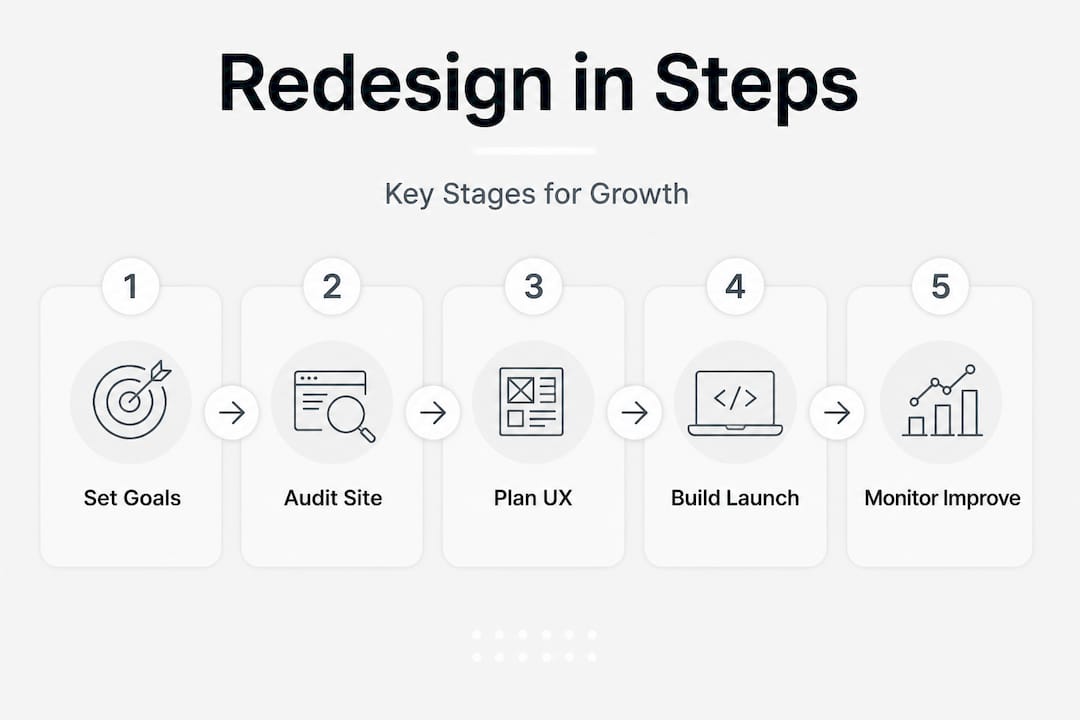
Redesigning your website is one of the most significant investments you can make in your business’s online presence. Done well, it can generate more leads, improve brand credibility, and increase conversions meaningfully. Done poorly, it can wipe out years of SEO progress and send enquiries plummeting overnight. The difference between these two outcomes is rarely about talent or budget. It is almost always about process. This guide gives you a clear, practical framework for approaching your redesign with confidence, protecting what you have built, and emerging stronger on the other side.
Table of Contents
- Preparation: Defining goals, requirements and success metrics
- Auditing your current website: What to keep, fix or remove
- Planning your redesign: Strategy, sitemap and UX considerations
- Execution: Building, testing and launching your redesigned site
- SEO risks and post-launch: Protecting rankings, traffic and conversion
- What most guides miss: The hidden dangers (and pay-offs) of website redesign
- Take your website redesign further with expert help
- Frequently asked questions
Key Takeaways
| Point | Details |
|---|---|
| Define clear goals | Set business and user objectives before redesigning for targeted improvements. |
| Audit thoroughly | Identify what content, pages, and features to keep or change based on current performance. |
| Prioritise UX and SEO | Design for speed, mobile and search performance at every stage. |
| Protect technical SEO | Document, redirect, and monitor URLs to avoid post-launch ranking loss. |
| Monitor after launch | Track metrics and fix issues immediately to safeguard traffic and conversions. |
Preparation: Defining goals, requirements and success metrics
After understanding the importance of a deliberate approach, the next step is to ensure you are fully prepared before beginning the technical process.
Most businesses make the mistake of jumping straight into visual design. They pick colours, choose fonts, and start building pages before they have answered the fundamental question: what do we actually need this website to achieve? A redesign is performance and conversion work, not just a visual refresh. Your first task is to get crystal clear on your business objectives.
Start by listing your top three goals. Are you trying to generate more phone enquiries? Increase online sales? Improve your brand perception amongst new visitors? Each of these goals shapes every subsequent decision, from page layout to navigation structure to which calls to action you prioritise.
Key goal-setting questions to answer before you start:
- What specific results do you want from this redesign within six months?
- Who is your primary audience, and what do they need to do on your website?
- What technical requirements are non-negotiable? Think mobile responsiveness, site speed, booking forms, or eCommerce functionality.
- Which analytics or tracking tools will you use to measure performance?
Once you understand your goals, define how you will measure success. This means deciding on concrete metrics before any work begins, not after. Common measures include conversion rate, bounce rate, average session duration, and the number of phone enquiries or contact form submissions per week. If you are learning how to design a business website that attracts and converts, having these benchmarks in place means you can prove the redesign worked.
Important: Record your current website’s performance data now. Export your traffic, rankings, and conversion data from Google Analytics and Google Search Console. This baseline is your single most important reference point throughout the entire project.
A practical approach to digital marketing for small business recognises that every redesign decision should ladder up to a measurable business outcome. If you cannot explain why a page or feature exists in terms of visitor value or business results, question whether it belongs in the new site at all.
| Success metric | Why it matters | How to track it |
|---|---|---|
| Conversion rate | Measures how many visitors take action | Google Analytics Goals |
| Bounce rate | Indicates whether content meets visitor expectations | Google Analytics |
| Organic traffic | Shows SEO health before and after | Google Search Console |
| Phone enquiries | Critical for service businesses | Call tracking software |
| Page load speed | Affects rankings and user experience | Google PageSpeed Insights |
Auditing your current website: What to keep, fix or remove
With your project’s objectives set, it is time to critically assess your existing website, so you know what strengths to build on and what weaknesses need urgent attention.
A thorough audit is not glamorous work, but it is where redesign projects are won or lost. Many businesses discard high-performing pages during a redesign simply because they looked dated. That is a costly mistake. To protect SEO during a redesign, you must document your high-risk and top-performing URLs before any changes are made.
Run your audit in this order:
- Export all URLs from Google Search Console and identify which pages attract the most organic traffic.
- Cross-reference with Google Analytics to find which pages generate the most conversions, leads, or revenue.
- Flag these as “high-risk” pages. They must be preserved, redirected carefully, or rebuilt with extreme care.
- Review underperforming content. Pages with minimal traffic, poor engagement, or outdated information are candidates for consolidation or removal.
- Map your current metadata, including title tags, meta descriptions, and heading structures, for every page you intend to keep or redirect.
- Document your internal linking structure. Understand which pages link to which, as breaking these links carelessly can harm authority flow.
Pro Tip: Use a tool such as Screaming Frog to crawl your entire site before the redesign begins. Export everything, including status codes, canonical tags, structured data, and response times. This document becomes your SEO safety net.
One useful framework is to divide your pages into three clear categories:
Keep and migrate: Top-performing pages with strong organic rankings, good engagement, and proven conversion rates. Preserve their URL structure wherever possible.
Keep and improve: Pages that have genuine value but underperform because of thin content, poor layout, or outdated information. These get a content upgrade during the redesign.
Remove or consolidate: Duplicate content, outdated service pages, or thin blog posts that add no value. Consider redirecting these to a more relevant page rather than simply deleting them.
A comparison like this ensures you are building on what already works rather than starting from scratch unnecessarily.

Planning your redesign: Strategy, sitemap and UX considerations
Armed with insights from your audit, you are ready to translate these findings into a practical, performance-focused redesign plan.
This is the stage where structure, user experience, and technical foundations come together. Before a single pixel is designed, you need a new sitemap that reflects both your business goals and your visitors’ needs. Think about the most common journeys users take. How do they find you? What do they need to know before getting in touch? What objections do they have?
A well-structured information architecture (IA) removes friction from these journeys. Group related content logically. Reduce the number of clicks between a visitor’s arrival and their enquiry. Every extra step you add to a journey reduces the likelihood of conversion.
Improving website UX is not just about aesthetics. It is about removing barriers to action. A visitor who cannot find your contact details within seconds, or who struggles to navigate on their phone, is a visitor you are likely to lose.
Key planning checklist:
- Develop a revised sitemap based on audit findings and user priorities
- Prioritise mobile-first design. Over half of all UK web traffic now comes from mobile devices
- Map Core Web Vitals targets: Largest Contentful Paint (LCP), Interaction to Next Paint (INP), and Cumulative Layout Shift (CLS)
- Define the user journeys for your three most important visitor types
- Sketch wireframes for every key page template before design begins
- Agree on calls to action for each page before visual design commences
Pro Tip: Do not skip wireframing, even if you are working with a tight budget or timeline. Wireframes reveal structural problems early, when they are cheap to fix. They prevent expensive design revisions later, and they force important conversations about priority and layout before anyone has invested time in high-fidelity design work.
When planning the redesign, consider the page templates you will need. Most small business websites require five or six core templates: homepage, service page, about page, contact page, and blog post. Keep the number of templates manageable. A site that is easy to attract and convert visitors is typically one that is simple, focused, and fast.
Execution: Building, testing and launching your redesigned site
With a strategic plan mapped out, the next stage is disciplined execution. Building and testing with diligence separates professional redesigns from those that cause problems post-launch.
Never build your new site on the live domain. Always use a staging environment, which is a private copy of your website hosted on a separate URL, to develop and test the redesign without impacting your live site. Your current website keeps generating enquiries while the new one is built safely in the background.
A proven pre-launch execution process:
- Build all page templates and populate content on the staging environment.
- Test every key function across multiple devices: forms, booking systems, shopping carts, navigation menus, and search functionality.
- Install and verify all tracking. Analytics and performance tracking must be tested on staging before launch, not discovered to be missing afterwards.
- Run speed tests on both mobile and desktop using Google PageSpeed Insights. Resolve any issues that affect Core Web Vitals scores.
- Review all redirects with your team. Every changed URL needs a 301 redirect mapped before go-live.
- Conduct a final stakeholder sign-off. This includes content review, branding approval, and legal compliance checks.
- Confirm your backup procedures are in place. If something goes wrong at launch, you need to be able to roll back quickly.
“A website redesign should treat performance, tracking, and mobile optimisation as core requirements, not optional extras.”
Once you launch, monitor the site intensively for the first 48 hours. Check that all redirects are working, that no pages return 404 errors, and that your tracking is firing correctly. Refer to SEO best practices to ensure nothing has been overlooked at this critical stage.
SEO risks and post-launch: Protecting rankings, traffic and conversion
After launch, your work is not over. SEO and performance vigilance are essential to protecting your hard-earned digital progress.
Post-launch is where many redesigns unravel. A business spends months building a new website, launches it with excitement, and then watches their organic traffic drop over the following weeks. This almost always comes down to unresolved technical SEO issues that were not caught quickly enough.
The most common culprits are broken redirects, missing metadata, duplicate canonical tags, pages accidentally set to “noindex,” and slow page load times on mobile. Any one of these can cause a measurable drop in rankings. Together, they can be devastating.
Documenting high-risk URLs and implementing 301 redirects properly is the single most important SEO task in any redesign. A 301 redirect tells search engines that a page has permanently moved, and transfers the vast majority of its ranking authority to the new URL.
Your post-launch SEO monitoring checklist:
- Verify all 301 redirects are working correctly on day one. Use a redirect checker tool to test each one.
- Run a full technical crawl using Screaming Frog or a similar tool within 24 hours of launch.
- Check Google Search Console for crawl errors, coverage issues, or any sudden drops in indexed pages.
- Monitor your keyword rankings daily for the first week. A tracking tool such as SEMrush or Ahrefs makes this straightforward.
- Review conversion data against your pre-launch benchmarks. If conversions drop significantly, investigate the user journey immediately.
- Fix issues as they surface. Rapid response in the first week after launch can mean the difference between a temporary blip and a sustained ranking loss.
Pro Tip: Submit your updated sitemap to Google Search Console immediately after launch. This signals to Google that significant changes have been made and encourages faster re-crawling of your updated pages.
Protecting your existing redesign SEO gains requires consistent attention for at least four to six weeks post-launch, not just the first day.
What most guides miss: The hidden dangers (and pay-offs) of website redesign
Most redesign guides cover the obvious steps. They tell you to test on mobile, to set up redirects, and to check your speed scores. That is all sound advice. But there is a category of risk that rarely gets discussed, and it is the one most likely to hurt you.
Switching your CMS or web framework mid-redesign is one of the highest-risk decisions you can make. Moving from WordPress to a headless CMS, or from a bespoke platform to Shopify, introduces an entirely new set of technical variables. Crawlability, canonical configurations, structured data, and page performance can all break in subtle ways that are not immediately visible but gradually erode your rankings. CMS or framework changes must be treated as first-class requirements from the start of the project, not an afterthought.
The second thing most guides miss is the real value of post-launch discipline. The launch day is exciting. The weeks that follow are where the real work happens. Most SEO setbacks occur because teams celebrate the launch and move on, leaving technical issues to fester unnoticed. Daily monitoring in the first week is not optional. It is the work that determines whether your investment pays off.
There is also a genuine opportunity hiding behind this discipline. Businesses that combine a well-executed redesign with consistent post-launch monitoring often see compounding gains. Rankings improve, conversion rates climb, and the investment in custom website design begins to deliver returns that continue growing over time rather than plateauing.
Treat technical infrastructure, redirect mapping, and post-launch monitoring not as tasks to tick off, but as the foundation of your long-term digital performance. The businesses that do this well are the ones that consistently outperform competitors online.
Take your website redesign further with expert help
A well-planned website redesign can be the turning point for your business’s online performance. But navigating the technical, strategic, and creative elements simultaneously is demanding, especially when you have a business to run.

At Fylde Digital, our web design services are built around exactly this kind of end-to-end, performance-focused approach. From initial audit to post-launch monitoring, we help small and medium-sized businesses protect their SEO while building websites that genuinely convert visitors into customers. Our team combines technical expertise with creative excellence, so you do not have to choose between a beautiful site and a high-performing one. You can also explore our website redesign SEO guide for further depth, or review our graphic design work to see how we approach brand-aligned visual development. Get in touch for a free website review today.
Frequently asked questions
How long does a typical website redesign take?
Most small business website redesigns take between 4 and 12 weeks, depending on the scale of the project, number of pages, and complexity of functionality required.
Will I lose my SEO rankings during a redesign?
Not if you carefully document high-performing URLs, set up proper 301 redirects, and audit technical SEO after launch. Preparation and post-launch monitoring are what protect your rankings.
What is the most common mistake in website redesign projects?
Neglecting technical SEO and redirect mapping are the most frequent causes of traffic and ranking loss following a redesign. These must be planned from the outset, not added as an afterthought.
Should I switch my CMS during a redesign?
Only switch CMS if you have a clear, justified reason for doing so. CMS changes can break crawlability, metadata, and page performance, so test thoroughly in a staging environment before any live migration.
How can I measure the success of my website redesign?
Track conversions, organic traffic, bounce rate, and time on site before and after launch. Comparing these metrics against your pre-launch benchmarks gives you a clear, objective picture of whether the redesign delivered on its goals.